
Community listing page, reviews here may not be monitored by the author.
Wynncraft Inventory Management 2

No reviews yet
Wynncraft item stats analysis, item dictionary and more!
Community voices
Reviews
No reviews yet. Be the first to review this project!
Get it on
Available Platforms
About
Project Details
For authors
Embed Badge
If you're the author of this project, you can embed a live badge anywhere that supports HTML or Markdown. It updates automatically whenever ratings change.
Use HTML for any page that supports it, or Markdown for README files and Markdown-based descriptions.
Identifiers
Platform IDs
Resources
External Links
About
Description
Wynncraft Inventory Management mod
Wynncraft Inventory Management (WIM) is an unofficial mod which provides many useful features!
*It only works on Forge mc-1.11.2 version! (WIM2 now support 1.11.2 & 1.12.2)
Version Note:
Because WIM2 support both 1.11.2 and 1.12.2, you need to download correct version of mod jar file in order to run!
*It is design for Wynncraft Server! However, item background color still working on other server :)
Features:
- Item background color render
- Slot lock
- Item Dictionary (Include equipment, potion and powder!)
- Item details
- Powerful Filter and Sorter
- Item stats analysis (include id percentage,
powder special level, reroll price,skill point sumand average percentage!) - Query potential items
Daily Reward counter- Identification sort
- Client side item cache
- Favourites
Item changes recorder- Currency display
- Configurable Settings
- and more!
Screenshots:
See "Images"
How to install it?
- Make sure you have forge mc 1.11.2/1.12.2
- Put the mod jar file into your mods folder
- Enjoy!
Get it started!
Use [K] for open item dictionary, [L] for lock slot and [Left-Ctrl] for analysis item stats! (They could be changed in game control settings)Press [K] when cursor hover on a item for query the item by its nameUse right click in Filter can select single tick box (available in Category and Tier)By left click a tick box in Sorter for add a option to sort queue, and right click a tick box for remove it from queue."Changes" only available when you success update item database from API (by click [Update] button in the Settings)You can change slot background color in settings! (e.g. change mythic item color to red)You need to go to Mod Options/Select WIM mod/click config for open settings pageBy cross the tickbox before identification in item detail page, you can ignore this identification when calculating average percentage.Some function store data on client, thus change client may loss it (e.g. locked slots and daily reward counter)Because all of item data come from wynn public API, therefore some of item stats may incorrect due to API issues.Stats percentage is calculated by max panel value, not the actually roll point.Make sure you have installed wynn resource pack :)Get more information by see the description of Images.- WIM2 replace dictionary with handbook, now open key is [H], and [L-Ctrl] for toggle Analyse mode.
Analyze Mode
Analyze Mode is very useful for see the stats of items. For active it, you have to hold L-Ctrl key while hover your cursor on an item. The key can be changed in the Settings-Control-WIM, or you can just enable "Always Analyze" in the mod settings.
--------------------------------------------------------------------------
For Identified Equipment:
Analyze Mode will show the max value and a percentage next to each identification on the item. The percentage is calculated by the panel value of the identification. If the value of the identification is maximum value or minimum value, it will be bold. Furthermore, if the item is unable to identify (e.g. dungeon items) or the identification value will not change (e.g. 1 or -1), the percentage will always be 100%, and a strikethrough will cross the percentage. It means the identification will not calculated in the average item percentage, which display next to the item name. You can disable some certain identifications when calculate the overall percentage of a item by yourself, just go to the item detail page of a item, and click the tick box next to the identifications which you want to disable. If the "Sort Identifies" function is enabled in settings, WIM will also sort the identifications with a better order for you.
The color of percentages:
70%-100% Green (Good)
30%-70% Yellow (Standard)
15%-30% Red (Bad)
0%-15% Dark Red (Very Bad)
-
The reroll price of the item will displayed next to rarity of the item. You can change the unit in the settings.
-
If the item have powder special ability, the tier of ability will display next to the name of ability.
Tier 1/5 Tier 4 Powder + Tier 4 Powder
Tier 2/5 Tier 4 Powder + Tier 5 Powder
Tier 3/5 Tier 5 Powder + Tier 5 Powder OR Tier 4 Powder + Tier 6 Powder
Tier 4/5 Tier 5 Powder + Tier 6 Powder
Tier 5/5 Tier 6 Powder + Tier 6 Powder
-
* You can click item dictionary key [K] while hover cursor on a item for show its detail as well
For unidentified item:
The possible items will be shown, with its identification price and its level.
* You can click item dictionary key [K] while hover cursor on a unidentified item for show the items within the range as well.
For store stuff:
The transfer price will be displayed under the item price (Emerald to EB/LE)
Daily Reward Timer
The daily reward timer will record when did you open the daily reward chest, and save it in local for calculate remaining cooldown. It means, if you have used another client or computer for open daily reward, the time record will not update, and you will see timer shows "--:--:--". In addition, you cannot open the daily reward chest if your character is lower than lv5, thus timer will goes error as well in the situation.
Removed in WIM2
Compatibility & Bugs
WIM is compatible with wynn expansion. However, I recommend use slot lock instead of use item lock since it will cause WIM unable to read locked item stats for one second (the problem of "LOCKED" text).
WIM2 compatible with Wynntils with 'limited' functionalities.
Update Local Data
If you see too many (OUTDATE) in your analyze mode, you probably should update the item data. Go to mod settings GUI by ESC/Mod Options/Select WIM/click configs, and click [Update] button to connect to wynn public API and request update. The public API may provide inaccurate data or even did not update-to-date, and it is nothing I can do. ¯\_(ツ)_/¯ Once you have updated at least one item, the changes and new items will shown in the [Changes] page in the item dictionary for you to check.
Update (13 May 2020)
Sorry for leave wynncraft for one year; it was a very busy year for me. Since alots of things have been changed during last year, this mod is totally outdated and I would not going to update it anymore.
I am recommend to take look Wynntils mod, which is a currently active and very cool mod for wynncraft ¯\_(ツ)_/¯. In addition, if you are luckly to see this message and very interesting about the future of WIM... Well, you may talk to me on discord for some news. :)
Update (18 May 2020) - WynnInvManager 2
I have released WIM2, which basically a rework of this mod. It still under development, so no all the features of WIM1 have been implemented in WIM2.
It is compatible with Wynntils, but its inventory functionality (e.g. Analyze Mode) will be overwritten by Wynntils.
Main Features:
Wynn Handbook, the default open key is [H]. This includes equipment/ingredient/powder/consumable/material dictionary with powerful filter/sort/condition search.
In addition, Handbook also come with an in-game Crafting Table for make Crafted Item and can be saved to equipment/consumable dictionary for future query. (Compatible with Wynntils)
Analyze Mode, inherit from WIM1. You can see item quality percentage, potential unid item, or preview craft result etc. by enable it.
Item Analysis mode can be toggled by default key L-Ctrl in inventory GUI. (NOT Compatible with Wynntils)
Item Render, inherit from WIM1 as well but changed mechanics.
Draw background color for items according to rarity or other conditions, and other useful additions. (Compatible with Wynntils when Force Item Render enabled)
Other Features:
Slot Lock, default key is [L].
Currency Display.
I made a discord server (but basically nothing yet) for discussion of the mod. Link: https://discord.gg/TmW4mB8
Donate Link
If you find this mod is helpful, please consider donating me :d
Screenshots
Gallery
-
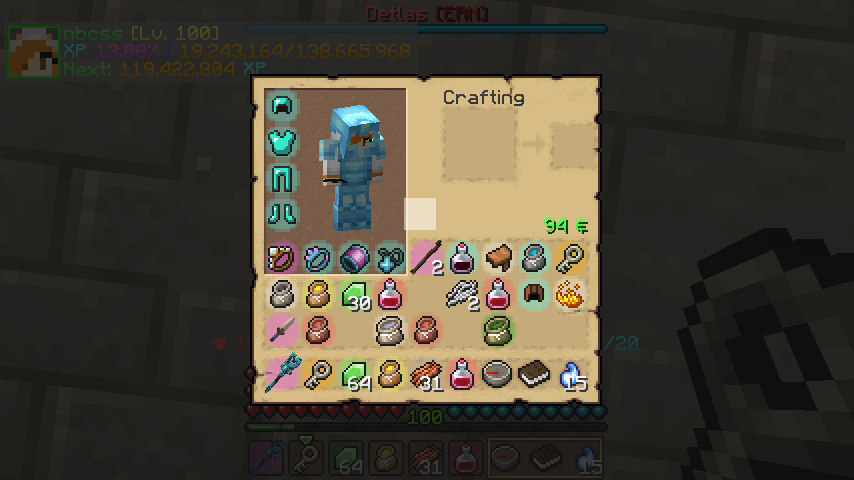 Inventory background color (WIM1 Legacy) The basic view of inventory
 -
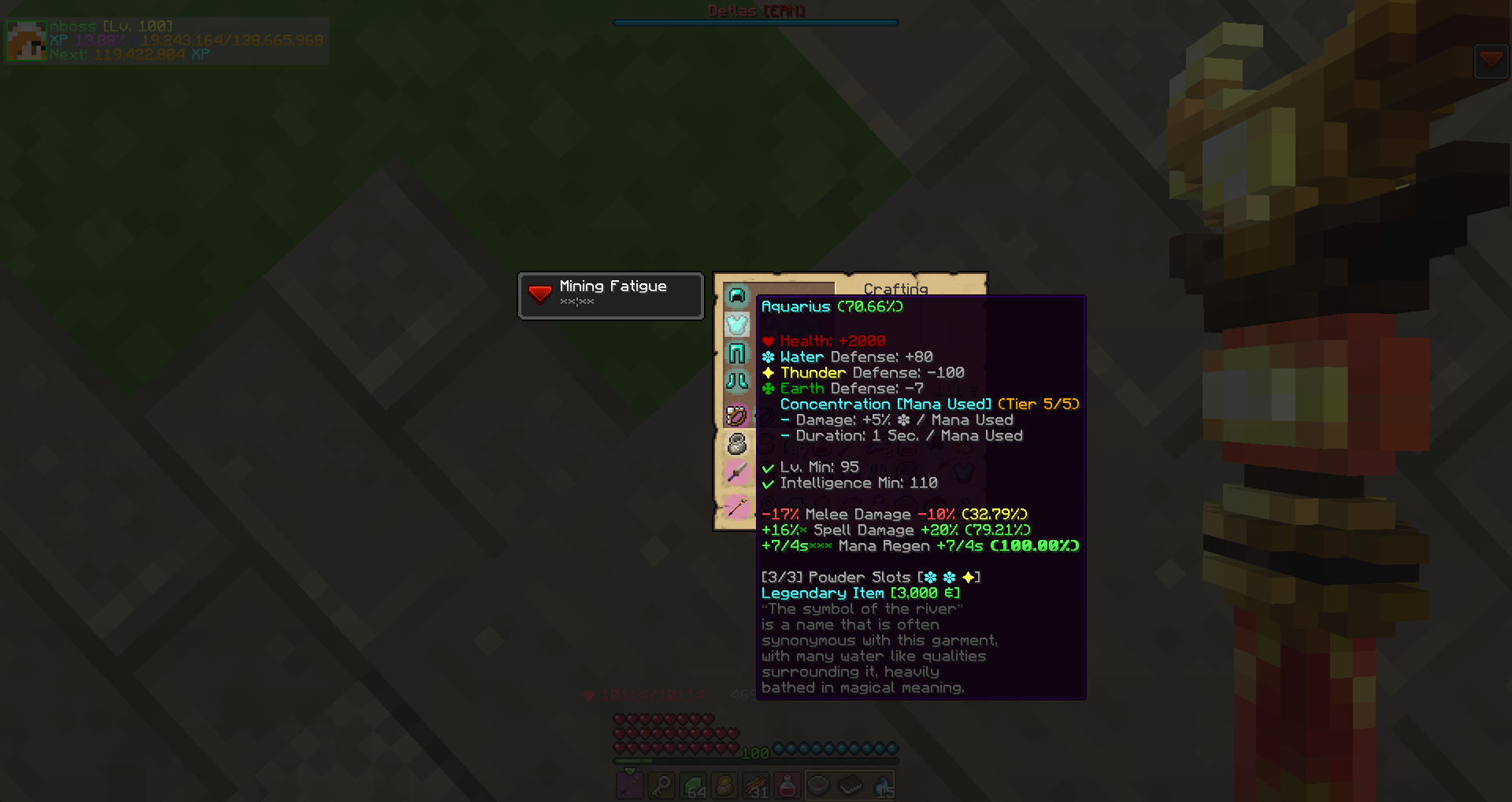 Analyze Mode 1 (WIM1 Legacy) Identified Item
 -
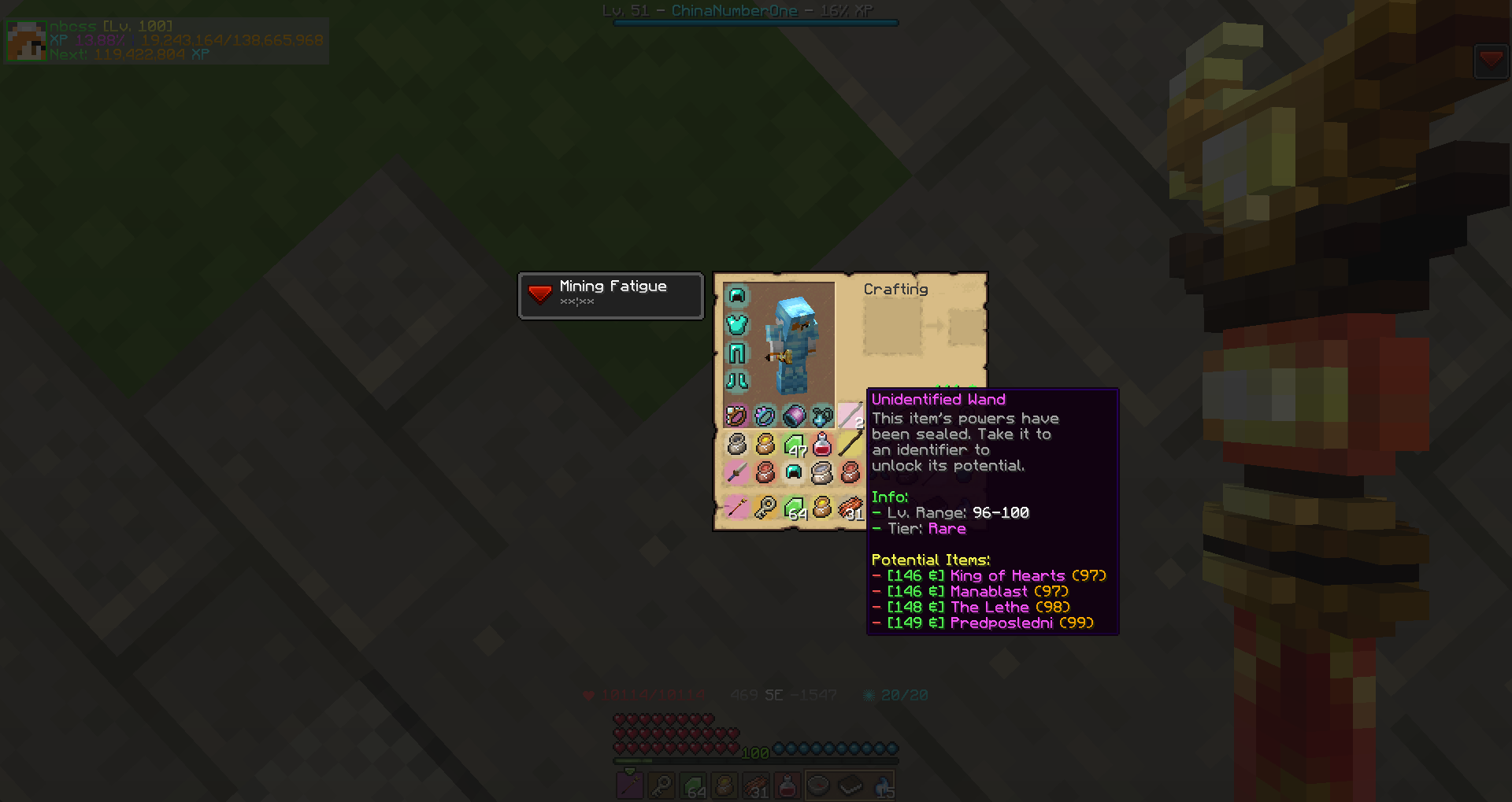 Analyze Mode 2 (WIM1 Legacy) Unidentified Item
 -
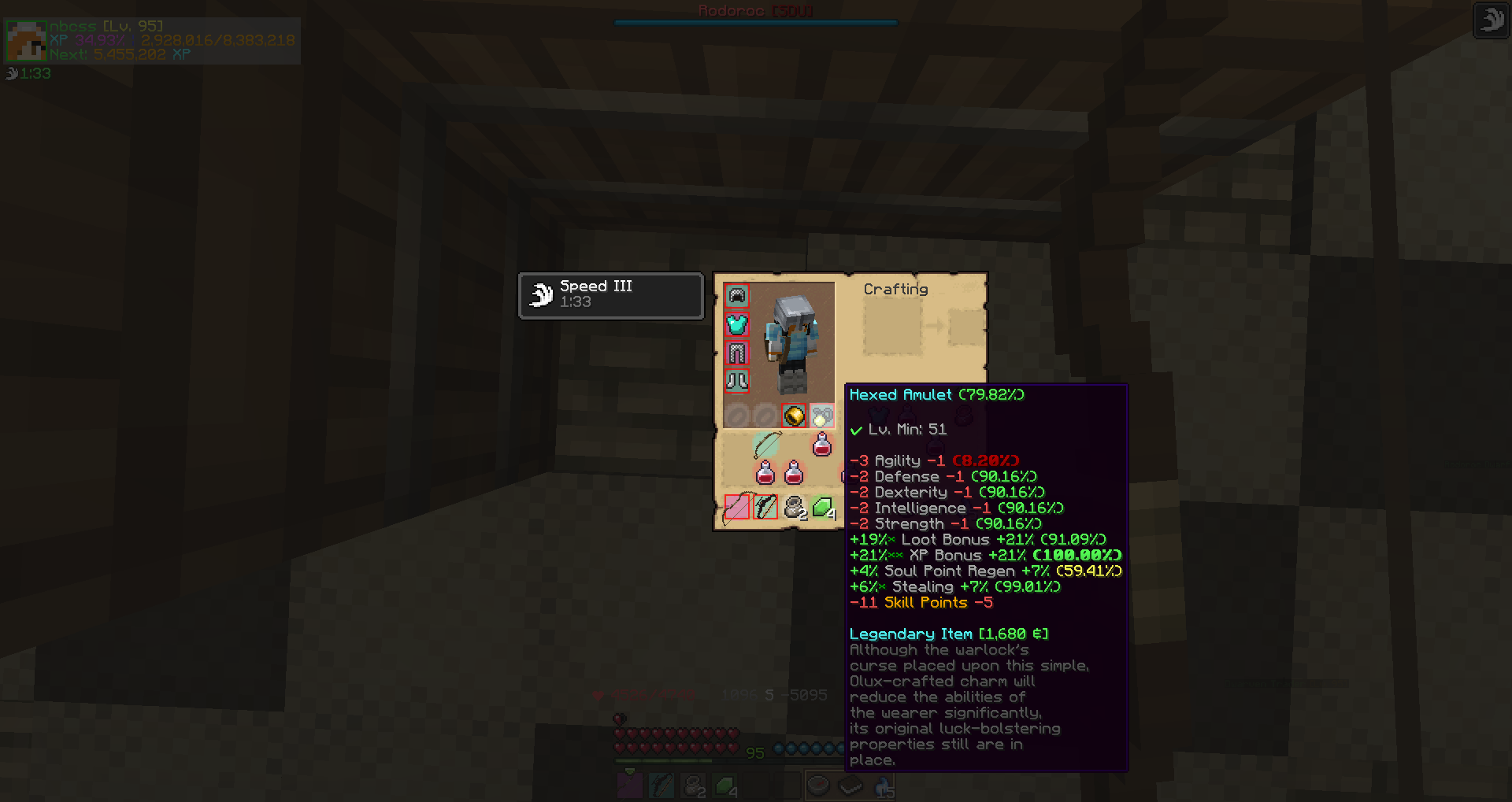 Analyze Mode 3 & Slot Lock (WIM1 Legacy) Skill Point Accumulator. You can lock some certain slots by click [L] when your cursor hover on a slot.
 -
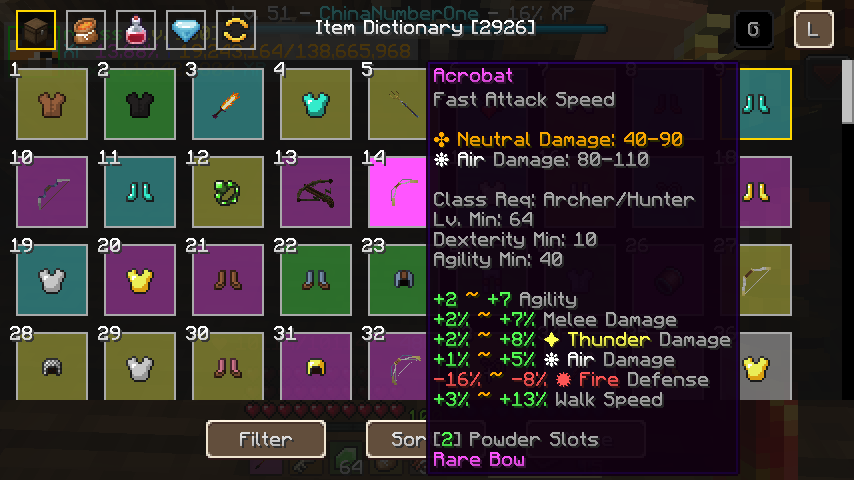 Item Dictionary (WIM1 Legacy) By click [K] for open item dictionary page (Can be changed in Settings-Control)
 -
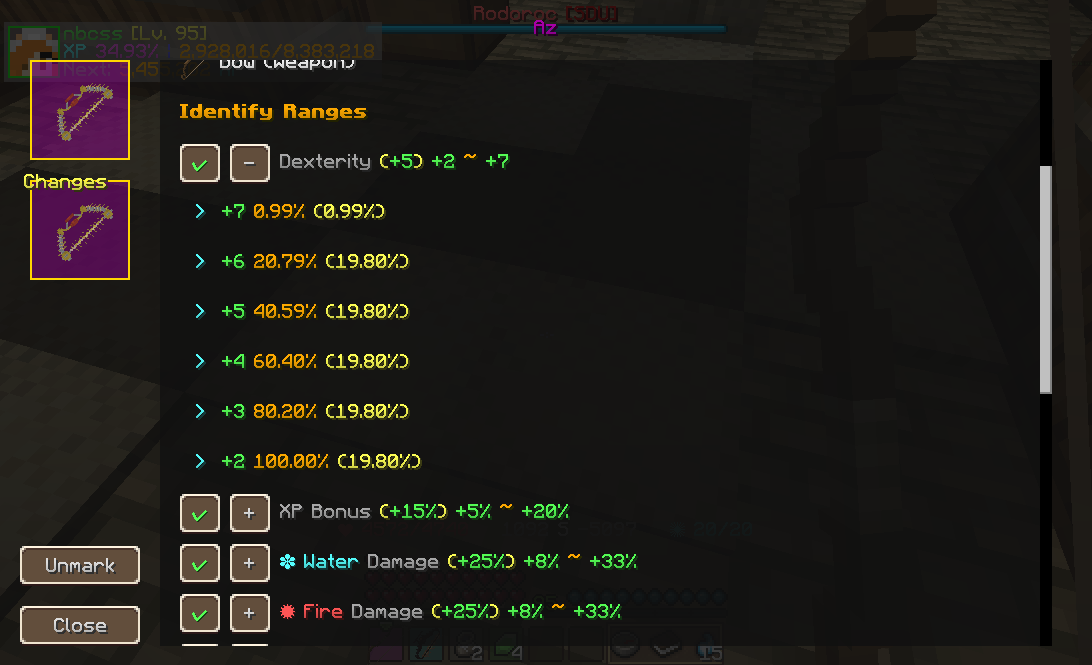 Item Detail (WIM1 Legacy) Left click a item in item dictionary for open the page
 -
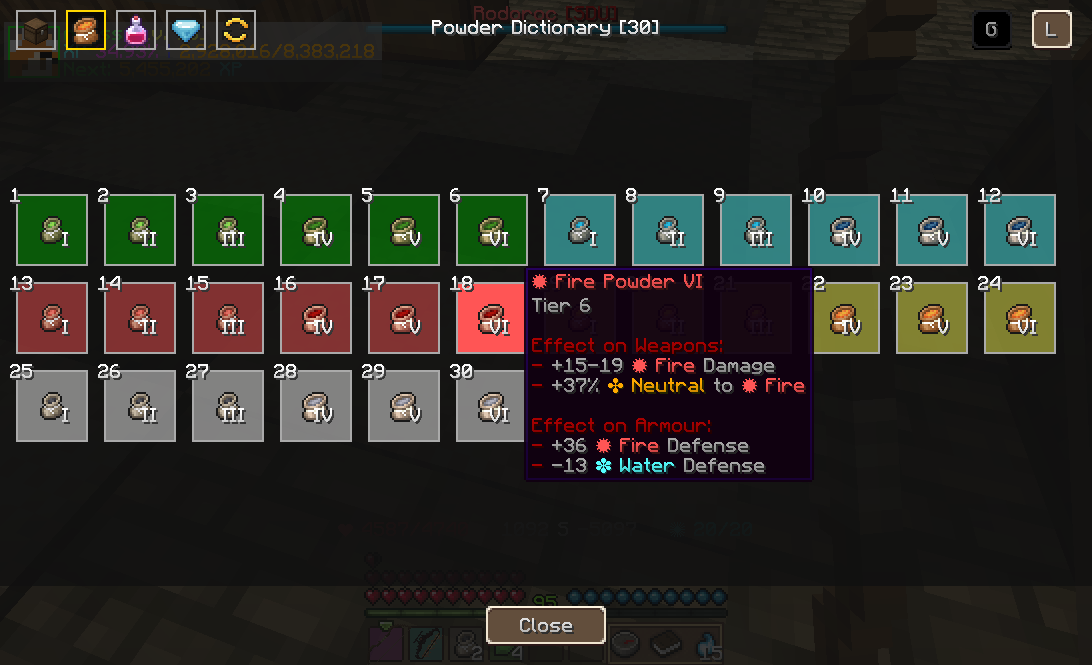 Powder Dictionary (WIM1 Legacy) Click the tag on the item dictionary page for switch
 -
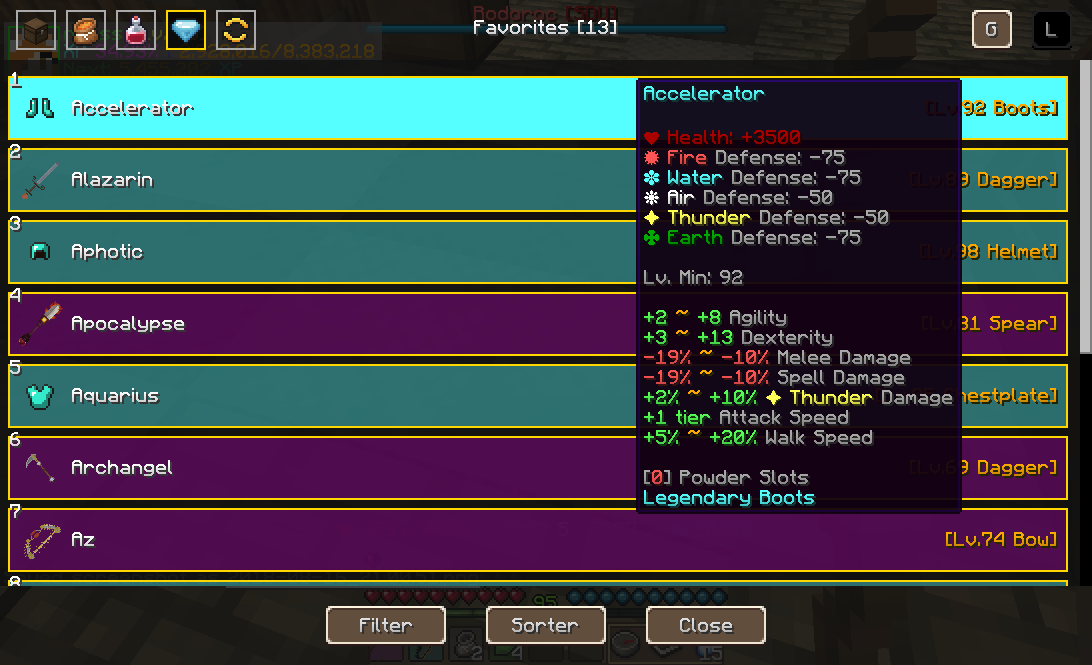 Favorite Items & List Mode (WIM1 Legacy) By right click the icon of a item in item dictionary page or click [Mark] button in item detail page for add this item into Favorites. You can see all of marked item here. You can change display mode to [List] by select [L] in the top-right corner.
 -
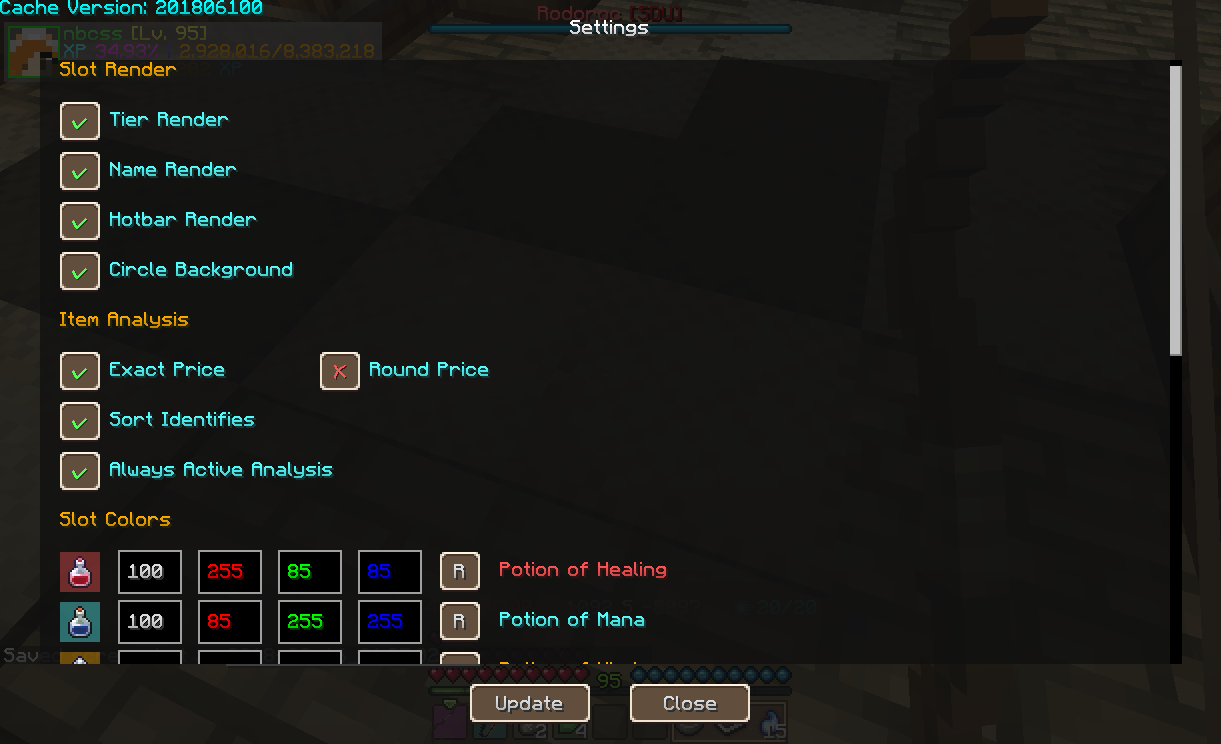 Settings Page (WIM1 Legacy) You can open the settings page by click [Mod Options] button in menu/Select WIM mod/click [config] button. You can change some general settings and item background color here, and update your item database by click [Update] button.
 -
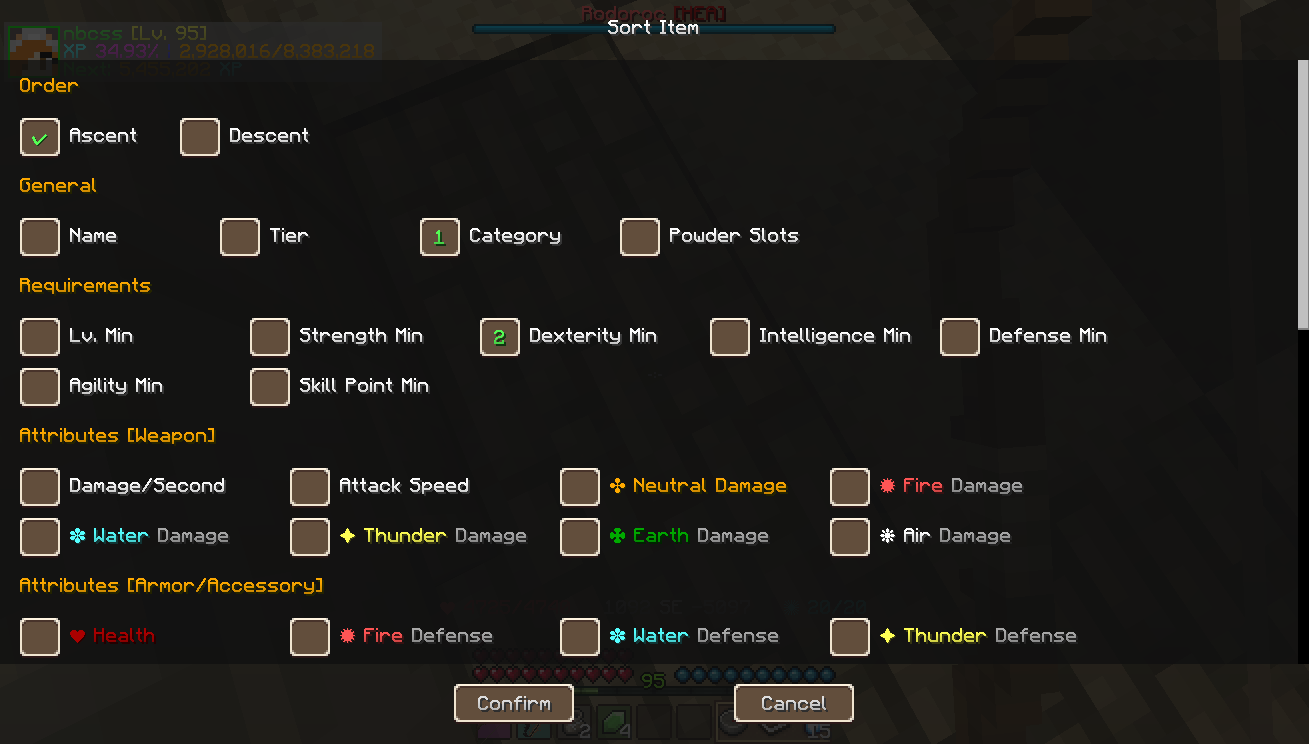 Item Sorter (WIM1 Legacy) You can sort the item page with certain order! Left click a sort option to add it into sort queue, and right click it for remove the option. (WIM1 Legacy)
 -
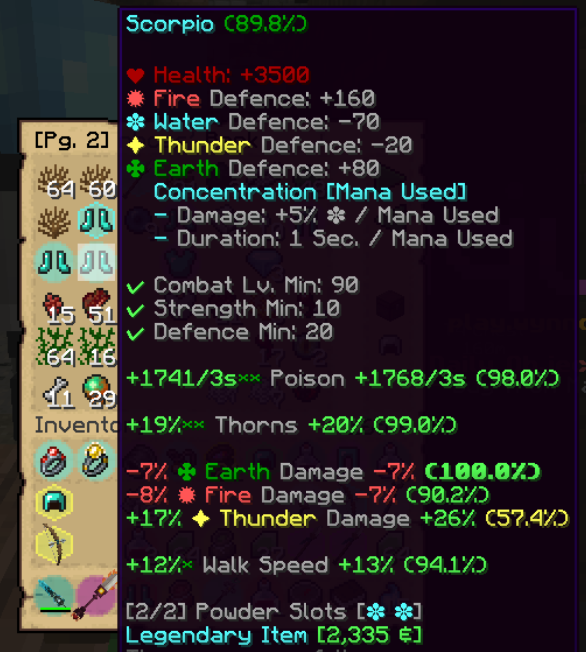 WIM2 Analyze Mode Analyze Mode and Inventory Item Render
 -
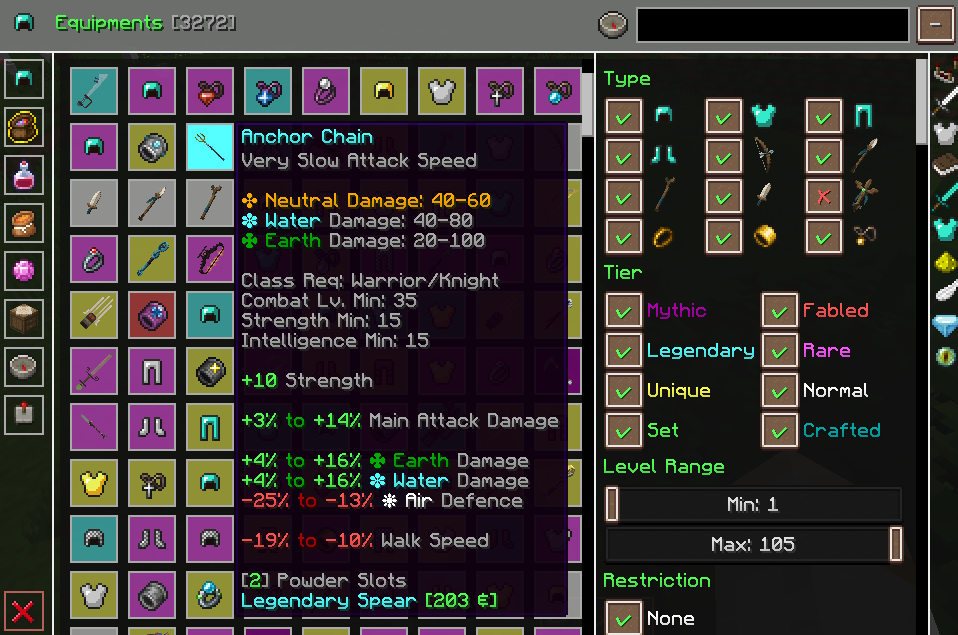 WIM2 Handbook (Equipment) Reworked Handbook GUI (Equipment Dictionary)
 -
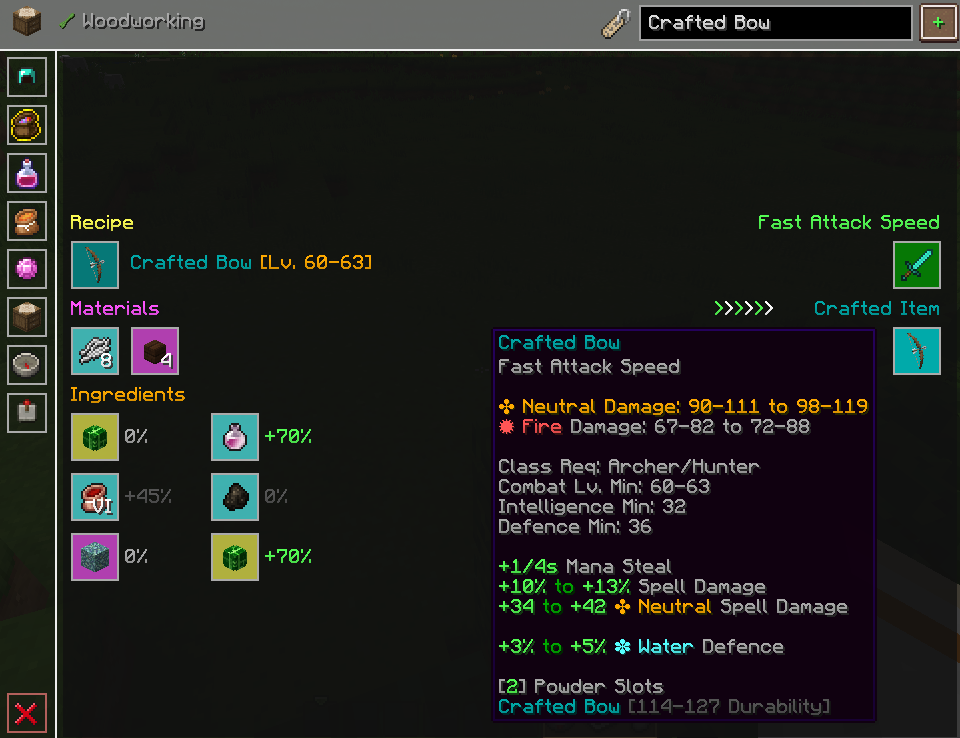 WIM2 Handbook (Crafting Table) Ingame Crafting Table for make Crafted Item and save it at local dictionary!
Versions
Files
Relations
Project Relations
More like this
Similar Mods
Suggestions use data such as tags, dependencies, dependents, descriptions, titles, and more to rank how much they overlap with this mod.
On ModDex
Community snapshot
By the numbers
Statistics
Want to reach Minecraft players?
We're looking for a server hosting partner to feature here and other parts of the site. Interested? Send us a message!
Get in touchGet it on
Available Platforms
On ModDex
Community snapshot
By the numbers
Statistics
Resources