Community listing page, reviews here may not be monitored by the author.
Not Enough Calculator


No reviews yet
A NEU-style calculator that works standalone or inside Roughly Enough Items (REI) & Skyblock Item List search bars!
Community voices
Reviews
No reviews yet. Be the first to review this project!
Get it on
Available Platforms
Compatibility
Supported Environments
Runs entirely on the client. Works on vanilla servers.
About
Project Details
For authors
Embed Badge
If you're the author of this project, you can embed a live badge anywhere that supports HTML or Markdown. It updates automatically whenever ratings change.
Use HTML for any page that supports it, or Markdown for README files and Markdown-based descriptions.
Identifiers
Platform IDs
About
Description
🧮 Not Enough Calculator




A NEU-style calculator that works standalone or inside Roughly Enough Items (REI) & Skyblock Item List search bars. Type calculations directly in the search bar and get instant results.
Inspired by NotEnoughUpdates calculator. Recreated for newer Minecraft versions where NEU isn't available.

Comprehensive Documentation:
To read a comprehensive version of this guide and see every single feature, table, examples, formulas, and 100+ player stats, read the README on GitHub.
What does this mod do?
Type calculations directly in the search bar and get instant results! Works inside Roughly Enough Items (REI)'s search bar, Skyblock Item List's search bar, or completely Standalone with its own bar at the bottom of inventory screens. If you played with NEU on older versions, you already know how this works.
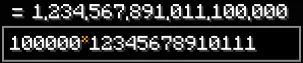
Example: Type 100m - 50m in the search bar → See = 50,000,000 instantly
Features Overview
Basic Math & Operators
| Category | Symbol / Keyword | Description |
|---|---|---|
| Addition | + |
Add numbers and unit terms |
| Subtraction | - |
Subtract numbers and unit terms |
| Multiplication | *, x, X |
Multiply numbers (* or x/X multiplier) |
| Division | / |
Divide numbers |
| Exponents | ^ |
Power / Exponent calculation |
| Modulo | % |
Remainder of division |
| Factorial | ! |
Integer Factorial (n!) |
| Percentage | % |
Percentage scaling (100 + 10% = 110) |
| Parentheses | ( ) |
Grouping & implicit multiplication |
| Bitwise AND / OR | &, | |
Bitwise AND and OR operations |
| Bitwise NOT / XOR | ~, xor(a, b) |
Bitwise NOT and XOR operations |
| Bit Shifts | <<, >> |
Bitwise left and right shift |
| Radix Literals | 0b, 0x, 0o |
Binary, Hexadecimal, and Octal literals |
Math & Logic Functions
| Category | Functions | Description |
|---|---|---|
| Roots & Abs | sqrt(x), abs(x) |
Square root and absolute value |
| Rounding | floor(x), ceil(x), round(x) |
Floor, ceiling, and nearest integer rounding |
| Logarithms | log(x), ln(x) |
Base-10 and natural logarithms (base e) |
| Trigonometry | sin(x), cos(x), tan(x) |
Trigonometric functions (degrees) |
| Angles | rad(x), deg(x) |
Convert between degrees and radians |
| Bounds | min(a, b), max(a, b), clamp(v, min, max) |
Minimum, maximum, and value clamping |
| Statistics | avg(a, b, ...), pct(a, b) |
Average and ratio percentage calculations |
| Number Theory | gcd(a, b), lcm(a, b) |
Greatest common divisor and least common multiple |
| Base Conversion | hex(x), bin(x), oct(x) |
Convert numbers to Hex, Binary, or Octal |
| Formatting | fmt(x) |
Format number to compact SkyBlock notation (1.5m) |
SkyBlock Units & Storage
| Unit Code | Exact Value | Description / Equivalent |
|---|---|---|
k, m, b, t |
1k to 1t | Thousand, Million, Billion, Trillion multipliers |
s, st, stack |
64 | Stack multiplier |
e |
160 | Enchanted item multiplier |
h, sc |
1,728 | Shulker Box / Small Chest capacity |
dc |
3,456 | Double Chest capacity |
eb |
2,880 | Ender Chest capacity |
XP Tables & Slayers
| Category | Function Syntax | Description |
|---|---|---|
| Skill XP | skillxp(lvl, [toLvl]) |
Skill XP milestones & level deltas (1–60) |
| Catacombs XP | cataxp(lvl, [toLvl]) |
Catacombs Dungeons XP milestones & deltas (1–50+) |
| Hunting / Rune / Social | huntingxp(), runecraftingxp(), socialxp() |
Specialized skill XP tables |
| Slayers | slayerxp(boss, lvl), zombiexp(), spiderxp(), wolfxp(), emanxp(), vampirexp() |
Universal & specific Slayer boss XP milestones |
| HotM / HotF Perks | perk("name") |
Live active Heart of the Mountain / Forest perk levels |
Market, Auctions & Taxes
| Category | Function Syntax | Description |
|---|---|---|
| Bazaar Instant Buy | bzb("ITEM") |
Live Bazaar Instant Buy price (lowest sell offer) |
| Bazaar Instant Sell | bzs("ITEM") |
Live Bazaar Instant Sell price (highest buy order) |
| Bazaar Spread / Margin | bzm("ITEM") |
Live Bazaar spread / margin (bzb - bzs) |
| Lowest BIN / Average | lb("ITEM"), lba("ITEM") |
Live Lowest BIN price & 3-day average |
| NPC / Motes Shop | npc("ITEM"), motes("ITEM") |
NPC vendor & Rift Motes shop values |
| Sacks & Universal Price | sack("ITEM"), price("ITEM") |
Item count in sacks & best available price |
| Payout Calculators | bz(price), ah(price, [hrs]), ahbin(price, [hrs]) |
Net payouts after Bazaar / AH taxes & fees |
Player Stats & Live Variables
Supports 100+ live player stats and currencies extracted via SkyblockAPI:
- Built-in & Custom:
ans,pi,e,$name(custom variables via/calcset) - Currencies:
$purse($p),$bank($b),$bits,$motes,$copper,$sowdust,$kernels,$gems,$soulflow - Core Stats:
$health,$maxhealth,$defense,$mana,$maxmana,$speed,$vitality,$sblevel,$cata,$classlevel - Mining & Powders:
$mithrilpowder,$gemstonepowder,$glacitepowder,$hotm,$hotf,$whispers - All 12 Essences:
$w(Wither),$u(Undead),$d(Dragon),$sp(Spider),$i(Ice),$di(Diamond),$g(Gold),$c(Crimson),$fe(Forest),$foss(Fossil),$sungeck(Sun Gecko),$saf(Safari) - Skills & Slayers:
$farm,$mine,$cmbt,$forag,$fish,$ench,$alch,$tame,$carp,$rev,$tara,$sven,$eman,$blaze,$vamp
Check the GitHub README for the full reference table of all identifiers and aliases.
Shortcuts & Controls
| Shortcut | Action |
|---|---|
Ctrl+Z / Ctrl+Y |
Undo / Redo calculation history |
Ctrl+C / Ctrl+X |
Copy / Cut full equation (or selected text) to clipboard |
Ctrl+A |
Select all text in search bar |
Ctrl+Left / Right |
Jump cursor by word boundaries |
Ctrl+Backspace / Delete |
Delete entire word left or right |
Enter |
Commit calculation to history |
Shift+Drag / Right-Click Drag |
Freely move and position the standalone search bar anywhere |
Click in Chat |
Click any /calc result in chat to copy to clipboard |
Commands
| Command | Description |
|---|---|
/calc <expression> |
Calculate directly in chat with click-to-copy result |
/calchist |
Show recent session calculation history |
/calcclear |
Clear current session calculation history |
/calcset <name> <expression> |
Create or update a persistent custom variable from chat |
/calcconfig |
Open interactive settings & custom variables manager screen |
/calcpos (or /calcconfig position) |
Open interactive search bar repositioning screen |
/calchelp [topic] |
In-game interactive guide covering all functions and stats |
Config Options
Open /calcconfig (or access via Mod Menu) to customize:
- Inline Results: Show / hide live calculation preview inside search bars.
- Unit Suggestions: Show / hide item conversions (e.g.
(1 double chest)). - Comma Formatting: Toggle thousand separator commas (
1,000,000vs1000000). - Shorthand Results: Toggle compact SkyBlock notation (
1.5m,2.5b). - Syntax Highlighting: Live color-coding for numbers, units, functions, market terms, and variables.
- Decimal Precision: Adjust output decimal places (
1to50). - Bazaar Flipper Perk: Set Community Center perk level (
Lvl 0= 1.25%,Lvl 1= 1.125%,Lvl 2= 1.0%). - History Shortcuts: Toggle
Ctrl+Z/Ctrl+Ycalculation recall. - Full Equation Copy: Toggle
Ctrl+Ccopying equation vs value only. - Force Standalone Mode: Use dedicated standalone search bar independently of REI / Item List.
- Custom Variables Manager: Add, edit, delete, and paginate persistent variables.
Dependencies
Required
- Fabric Loader (
0.19.5+) - Fabric API (
0.155.3+) - Fabric Language Kotlin (
1.14.1+kotlin.2.4.20+)
Optional / Recommended
- Roughly Enough Items (REI) (
26.1.819+) - Skyblock Item List (
0.0.21+) - Mod Menu (
18.0.1+)
How to Install
- Download the required dependencies and place them into your Minecraft
mods/folder. - Place Not Enough Calculator into the
mods/folder. - Launch Minecraft with Fabric Loader.
- Open any inventory screen and start calculating directly in the search bar!
Support & FAQ
Have questions, unexpected behavior, or need help configuring search bar positions, tax rates, or API stats?
Check out our comprehensive FAQ and troubleshooting guide on GitHub:
Support & Troubleshooting Guide
- Report Bugs: GitHub Issues
- Discord Community: Join our Discord
Why This Mod?
NEU (NotEnoughUpdates) had a great calculator built into its search bar. NEU doesn't exist for newer Minecraft versions though, so this mod fills that gap. Works with Roughly Enough Items (REI), Skyblock Item List, or runs completely standalone.
Credits
- Original calculator concept inspired by NotEnoughUpdates (NEU).
- Uses SkyblockAPI to fetch/retrieve Hypixel Skyblock data.
Modpacks
Feel free to include this mod in any modpack without restriction!
Contributing
Want to help improve Not Enough Calculator? Check out our Contributing Guide.
License
Read Licensing Notice and Transition Statement.
See the full license text here:
View License
Maintained by Laze & Rijz
Type. Calculate. Profit.
Last updated: 12-09-2026
🧮 Not Enough Calculator


A NEU-style calculator that works standalone or inside Roughly Enough Items (REI) & Skyblock Item List search bars. Type calculations directly in the search bar and get instant results.
Inspired by NotEnoughUpdates calculator. Recreated for newer Minecraft versions where NEU isn't available.
What does this mod do?
Type calculations directly in the search bar and get instant results! Works inside Roughly Enough Items (REI)'s search bar, Skyblock Item List's search bar, or completely Standalone with its own bar at the bottom of inventory screens. If you played with NEU on older versions, you already know how this works.
Example: Type 100m - 50m in the search bar → See = 50,000,000 instantly
Features
Basic Math & Operators
| Category | Symbol / Keyword | Description | Example Input | Result Output |
|---|---|---|---|---|
| Addition | + |
Add numbers and unit terms | 100m + 50m |
150,000,000 |
| Subtraction | - |
Subtract numbers and unit terms | 1b - 250m |
750,000,000 |
| Multiplication | *, x, X |
Multiply numbers (* or x/X multiplier) |
10x5, 10k * 5 |
50, 50,000 |
| Division | / |
Divide numbers | 100m / 4 |
25,000,000 |
| Exponents | ^ |
Power / Exponent calculation | 2^10 |
1,024 |
| Modulo | % |
Remainder of division | 10 % 3 |
1 |
| Factorial | ! |
Integer Factorial ($n!$) | 5! |
120 |
| Percentage | % |
Percentage scaling (100 + 10% = 110) |
100 + 10% |
110 |
| Parentheses | ( ) |
Grouping & implicit multiplication | 2(3+4), (3)(4) |
14, 12 |
| Bitwise AND | & |
Bitwise AND operation | 0b1010 & 0b1100 |
0b1000 |
| Bitwise OR | | |
Bitwise OR operation | 0b1010 | 0b0101 |
0b1111 |
| Bitwise NOT | ~ |
Bitwise NOT operation | ~0, ~5 |
-1, -6 |
| Left Shift | << |
Bitwise left shift | 1 << 4 |
16 |
| Right Shift | >> |
Bitwise right shift | 16 >> 2 |
4 |
| Binary Literal | 0b |
Binary number literal | 0b1010 |
0b1010 |
| Hex Literal | 0x |
Hexadecimal number literal | 0xFF |
0xFF |
| Octal Literal | 0o |
Octal number literal | 0o77 |
0o77 |
Math & Logic Functions
| Category | Function Syntax | Description | Example Input | Result Output |
|---|---|---|---|---|
| Roots & Abs | sqrt(x) |
Square root of $x$ | sqrt(144) |
12 |
abs(x) |
Absolute value of $x$ | abs(-50) |
50 |
|
| Rounding | floor(x) |
Round down to nearest integer | floor(3.9) |
3 |
ceil(x) |
Round up to nearest integer | ceil(3.1) |
4 |
|
round(x) |
Round to nearest integer | round(3.5) |
4 |
|
| Logarithms | log(x) |
Base-10 logarithm | log(100) |
2 |
ln(x) |
Natural logarithm (base $e$) | ln(e) |
1 |
|
| Trigonometry | sin(x) |
Sine of angle in degrees | sin(90) |
1 |
cos(x) |
Cosine of angle in degrees | cos(0) |
1 |
|
tan(x) |
Tangent of angle in degrees | tan(45) |
1 |
|
| Angles | rad(x) |
Convert degrees to radians | rad(180) |
3.14159... |
deg(x) |
Convert radians to degrees | deg(pi) |
180 |
|
| Bounds | min(a, b) |
Smaller of two values | min(10, 5) |
5 |
max(a, b) |
Larger of two values | max(10, 5) |
10 |
|
clamp(v, min, max) |
Clamp value to min/max range | clamp(15, 0, 10) |
10 |
|
| Statistics | avg(a, b, ...) |
Average of any number of inputs | avg(10, 20, 30) |
20 |
pct(a, b) |
Ratio percentage ($a$ as % of $b$) | pct(50, 200) |
25 |
|
| Number Theory | gcd(a, b) |
Greatest common divisor | gcd(12, 18) |
6 |
lcm(a, b) |
Least common multiple | lcm(12, 18) |
36 |
|
| Base Conversions | hex(x) |
Convert decimal to Hexadecimal | hex(255) |
0xFF |
bin(x) |
Convert decimal to Binary | bin(10) |
0b1010 |
|
oct(x) |
Convert decimal to Octal | oct(63) |
0o77 |
|
| Bitwise | xor(a, b) |
Bitwise XOR function | xor(10, 12) |
6 |
| Formatter | fmt(x) |
Format number to SkyBlock shorthand | fmt(1500000) |
1.5m |
SkyBlock Units & Storage
| Unit Code | Exact Value | Description / Equivalent | Example Input | Result Output |
|---|---|---|---|---|
k |
1,000 | Thousand multiplier | 10k |
10,000 |
m |
1,000,000 | Million multiplier | 5m |
5,000,000 |
b |
1,000,000,000 | Billion multiplier | 2b |
2,000,000,000 |
t |
1,000,000,000,000 | Trillion multiplier | 1t |
1,000,000,000,000 |
s, st, stack, stacks |
64 | Stack multiplier | 3s, 2st, 5stacks |
192 |
e |
160 | Enchanted item multiplier | 2e |
320 |
h |
1,728 | Shulker Box capacity | 1h |
1,728 |
sc |
1,728 | Small Chest capacity | 1sc |
1,728 |
dc |
3,456 | Double Chest capacity | 2dc |
6,912 |
eb |
2,880 | Ender Chest capacity | 1eb |
2,880 |
XP Tables & Perks
| Category | Function Syntax | Alternative Aliases | Description | Example Input | Result Output |
|---|---|---|---|---|---|
| Skill XP | skillxp(lvl, [toLvl]) |
skill_xp, skilltable |
Skill XP milestones & level deltas (1–60) | skillxp(40, 50) |
29,650,000 |
| Hunting XP | huntingxp(lvl, [toLvl]) |
hunting_xp, huntingtable |
Hunting XP milestones & level deltas (1–50) | huntingxp(50) |
55,172,425 |
| Runecrafting XP | runecraftingxp(lvl, [toLvl]) |
runecrafting_xp, runetable |
Runecrafting XP milestones & deltas (1–25) | runecraftingxp(25) |
94,450 |
| Social XP | socialxp(lvl, [toLvl]) |
social_xp, socialtable |
Social XP milestones & deltas (1–25) | socialxp(25) |
272,800 |
| Catacombs XP | cataxp(lvl, [toLvl]) |
cata_xp, catatable, cxp_table |
Catacombs XP milestones & level deltas (1–50+) | cataxp(50) |
569,809,640 |
| Slayer XP | slayerxp([boss], lvl, [toLvl]) |
slayer_xp, slayertable |
Universal Slayer XP milestones (Zombie, Spider, Wolf, Enderman, Blaze, Vampire) | slayerxp(spider, 2) |
25 |
| Zombie / Wolf Slayer | zombiexp(lvl, [toLvl]) |
revxp, revenantxp, wolfxp, svenxp |
Zombie (Revenant) & Wolf (Sven) Slayer XP milestones | zombiexp(4) |
1,500 |
| Spider Slayer | spiderxp(lvl, [toLvl]) |
spider_xp, tarantulaxp, tarantula_xp, spidertable |
Spider / Tarantula Slayer XP | spiderxp(2) |
25 |
| Enderman / Blaze | emanxp(lvl, [toLvl]) |
voidgloomxp, endermanxp, blazexp, infernoxp |
Enderman (Voidgloom) & Blaze (Inferno) Slayer XP | emanxp(4) |
1,500 |
| Vampire Slayer | vampirexp(lvl, [toLvl]) |
vampire_xp, vampiretable, vampslayerxp, riftstalkerxp |
Vampire Slayer XP milestones & deltas (1–5) | vampirexp(5) |
2,400 |
| Active Perks | perk("name") |
hotmperk, hperk |
Live active HotM / HotF perk level | perk(mining_speed) |
50 |
Bazaar, Auction House & Taxes
| Category | Function Syntax | Alternative Alias | Description | Example Input | Result Output |
|---|---|---|---|---|---|
| Bazaar Buy | bzb("ITEM") |
bzbuy("ITEM") |
Live Bazaar Instant Buy price (lowest sell offer) | bzb(SUPERBOOM_TNT) |
3,200 |
| Bazaar Sell | bzs("ITEM") |
bzsell("ITEM") |
Live Bazaar Instant Sell price (highest buy order) | bzs("COBBLESTONE") |
3.5 |
| Bazaar Margin | bzm("ITEM") |
bzmargin("ITEM") |
Live Bazaar spread / margin (bzb - bzs) |
bzm(SUPERBOOM_TNT) |
450 |
| Lowest BIN | lb("ITEM") |
lowestbin("ITEM") |
Live Lowest BIN auction price | lb(HYPERION) |
1,850,000,000 |
| Lowest BIN Avg | lba("ITEM") |
lowestbinavg("ITEM") |
3-Day Lowest BIN average price | lba("HYPERION") |
1,900,000,000 |
| NPC Sell Price | npc("ITEM") |
npcsell("ITEM") |
Hypixel NPC shop sell price | npc(COBBLESTONE) |
3 |
| Motes Sell Price | motes("ITEM") |
motessell("ITEM") |
Rift Motes shop sell value | motes("RIFT_ITEM") |
500 |
| Universal Price | price("ITEM") |
N/A | Lowest available price across Bazaar & BIN | price(HYPERION) |
1,850,000,000 |
| Player Sacks | sack("ITEM") |
sackcount("ITEM") |
Total item count stored in player sacks | sack(COBBLESTONE) |
20,480 |
| Bazaar Net Payout | bz(price) |
N/A | Net payout after Bazaar tax (scales with Flipper perk) | bz(100m) |
98,750,000 |
| AH Auction Payout | ah(price, [hrs]) |
N/A | Net payout after AH auction 5% fee + listing tax | ah(50m) |
46,999,955 |
| AH BIN Net Payout | ahbin(price, [hrs]) |
N/A | Net payout after AH BIN listing fee + collection tax | ahbin(50m, 24) |
48,499,650 |
Variables & Player Stats
Important Note
- Many live SkyBlock data are extracted from Hypixel's Tablist/Tab Widget by SkyblockAPI. Ensure you have those relevant widgets turned on in
/tablist; otherwise, those specific live stats may not be available and the mod might not function as expected.
Built-in & Custom Variables
| Variable | Full Identifier | Type | Description | Example Input |
|---|---|---|---|---|
| Last Result | ans |
Built-in | Holds the last calculation result | ans * 2 |
| Pi Constant | pi |
Built-in | Mathematical constant $\pi \approx 3.14159265$ | 2 * pi |
| Euler's Number | e |
Built-in | Constant $e \approx 2.71828182$ (when standalone) | ln(e) |
| Custom Variable | $name |
User-defined | Persistent variable created via /calcset or GUI manager |
$profit * 2 |
Currencies
| Currency | Full Identifier | Short Alias(es) | Description | Example Input |
|---|---|---|---|---|
| Purse Coins | $purse, $coins, $money |
$p, $coin |
Purse coin balance | $purse + $bank, $coins / 2 |
| Bank Coins | $bankcoins, $bank |
$b |
Bank coin balance | $bank / 2 |
| Personal Bank | $personalbank |
$pbank |
Personal bank coins | $pbank + 10m |
| Coop Bank | $coopbank |
$cbank |
Coop bank coins | $cbank / 4 |
| Bits | $bits |
$bt, $bit |
Hypixel Bits balance | $bits * 1000 |
| Motes | $motes |
$mt, $mote |
Rift Motes balance | $motes / 50 |
| Copper | $copper |
$cop |
Garden Copper balance | $copper * 500 |
| Sowdust | $sowdust |
$sdust |
Garden Sowdust count | $sowdust / 10 |
| Kernels | $kernels |
$kern, $kernel |
Garden Kernels count | $kernels * 100 |
| North Stars | $northstars, $northstar |
$ns, $nstars, $star, $stars |
Winter Island North Stars | $ns * 50k |
| Gems | $gems |
$gem |
SkyBlock Gems balance | $gems * 100 |
| Soulflow | $soulflow |
$sf, $sflow |
Soulflow count | $soulflow * 5k |
Player & Dungeon Stats
| Stat | Full Identifier | Short Alias(es) | Description | Example Input |
|---|---|---|---|---|
| SkyBlock Level | $skyblocklevel, $sblevel |
$sb, $sblvl, $sblev, $level |
Current SkyBlock Level | $sblevel * 100k |
| Level Progress | $sblevelprogress, $levelprogress |
$sbprog, $sblevelprog, $levelprog |
Progress to next SB Level | 100 - $sbprog |
| Faction Reputation | $reputation |
$rep |
Nether Faction Reputation | $rep / 1000 |
| Health | $health |
$hp |
Current Health points | $hp / $maxhp |
| Max Health | $maxhealth |
$mhp, $maxhp |
Maximum Health points | $maxhp + 500 |
| Defense | $defense, $defence |
$def |
Current Defense stat | $def / ($def + 100) |
| Intelligence / Mana | $intelligence |
$mana, $intel |
Current Mana points | $mana * 2 |
| Max Mana | $maxmana, $maxintelligence |
$mmana, $maxintel |
Maximum Mana points | $maxmana - 500 |
| Overflow Mana | $overflowmana |
$ofmana |
Current Overflow Mana | $ofmana * 10 |
| Vitality | $vitality |
$vit |
Current Vitality stat | $vit + 50 |
| Max Vitality | $maxvitality |
$mvit |
Maximum Vitality stat | $mvit |
| Speed | $speed |
$spd |
Current Speed stat | $spd / 400 |
| Vanilla XP Level | $xplevel |
$xp, $xplvl |
Vanilla Minecraft XP Level | $xp * 100 |
| Catacombs Level | $catacombslevel, $catacombs |
$cata, $catalvl |
Dungeons Catacombs Level | $cata * 10 |
| Class Level | $dungeonclass, $classlevel |
$dclass, $classlvl |
Active Dungeon Class Level | $classlevel * 5 |
| Dungeon Party Size | $dungeonparty, $partysize |
$party |
Current Dungeon Party Size | 5 - $party |
Mining, HOTM & HOTF
| Stat | Full Identifier | Short Alias(es) | Description | Example Input |
|---|---|---|---|---|
| Mithril Powder | $mithrilpowder, $mithril |
$mpowder, $mpowd, $mith |
Current Mithril Powder | (1m - $mithrilpowder) / 50k |
| Gemstone Powder | $gemstonepowder, $gemstone |
$gpowder, $gpowd |
Current Gemstone Powder | 1m - $gpowder |
| Glacite Powder | $glacitepowder, $glacite |
$glpowder, $glpowd, $glac |
Current Glacite Powder | 500k - $glpowder |
| Total Mithril | $totalmithrilpowder, $totalmithril |
$totmpowder, $totmithril, $totmith |
Lifetime Total Mithril | $totmpowder / 1m |
| Total Gemstone | $totalgemstonepowder, $totalgemstone |
$totgpowder, $totgemstone, $totgem |
Lifetime Total Gemstone | $totgpowder / 1m |
| Total Glacite | $totalglacitepowder, $totalglacite |
$totglpowder, $totglacite, $totglac |
Lifetime Total Glacite | $totglpowder / 1m |
| HOTM Tier | $hotmtier |
$hotm |
Heart of the Mountain Tier | 10 - $hotm |
| HOTM Tokens | $hotmtokens, $tokens |
$token |
Available HOTM Tokens | $tokens * 2 |
| HOTF Tier | $hotftier |
$hotf, $htier |
Heart of the Forest Tier | $hotf + 1 |
| HOTF Tokens | $hotftokens, $htokens |
$htoken |
Available HOTF Tokens | $htokens * 10 |
| Forest Whispers | $forestwhispers |
$whisp, $whisper, $whispers, $fwhisper, $fwhispers |
Current Forest Whispers | $whispers / 100 |
| Desert Whispers | $desertwhispers |
$dwhispers, $dwhisper |
Current Desert Whispers | $dwhispers / 50 |
Essences
| Essence | Full Identifier(s) | Short Alias(es) | Description | Example Input |
|---|---|---|---|---|
| Wither Essence | $witheressence, $wessence |
$w, $wither |
Wither Essence count | $w * 5k |
| Undead Essence | $undeadessence, $uessence |
$u, $undead |
Undead Essence count | $u * 1k |
| Dragon Essence | $dragonessence, $dessence |
$d, $dragon |
Dragon Essence count | $d * 2k |
| Spider Essence | $spideressence, $spessence |
$sp, $spider |
Spider Essence count | $sp * 1.5k |
| Ice Essence | $iceessence, $iessence |
$i, $ice |
Ice Essence count | $i * 3k |
| Diamond Essence | $diamondessence, $diessence |
$di, $diamond |
Diamond Essence count | $di * 10k |
| Gold Essence | $goldessence, $gessence |
$g, $gold |
Gold Essence count | $g * 8k |
| Crimson Essence | $crimsonessence, $cessence |
$c, $crimson |
Crimson Essence count | $c * 6k |
| Forest Essence | $forestessence, $foressence |
$fe, $forest |
Forest Essence count | $fe * 10k |
| Fossil Essence | $fossilessence, $fossessence |
$foss, $fossil |
Fossil Essence count | $foss * 50k |
| Sun Gecko Essence | $sungeckoessence, $geckoessence |
$sungeck, $sungecko, $gecko |
Sun Gecko Essence count | $gecko * 100k |
| Safari Essence | $safariessence, $safessence |
$saf, $safari |
Safari Essence count | $saf * 25k |
Pets & Bestiary
| Stat / Category | Full Identifier | Short Alias(es) | Description | Example Input |
|---|---|---|---|---|
| Pet Level | $petlevel |
$pet, $petlvl |
Active Pet Level | $pet * 100k |
| Pet XP | $petexperience, $petxp |
$pxp |
Active Pet Experience | 25m - $pxp |
| Bestiary Level | $bestiarylevel |
$best, $bestiary, $bestiarylvl |
Current Bestiary Level | $best * 50k |
| Total Trophy Fish | $trophyfishcount, $trophyfish |
$tfish |
Total Trophy Fish caught | $tfish * 10k |
| Diamond Trophy | $diamondtrophyfish, $diamondtrophy |
$dtrophy |
Diamond Trophy Fish count | $dtrophy * 100k |
| Gold Trophy | $goldtrophyfish, $goldtrophy |
$gtrophy |
Gold Trophy Fish count | $gtrophy * 50k |
| Silver Trophy | $silvertrophyfish, $silvertrophy |
$strophy |
Silver Trophy Fish count | $strophy * 20k |
| Bronze Trophy | $bronzetrophyfish, $bronzetrophy |
$btrophy |
Bronze Trophy Fish count | $btrophy * 10k |
| Accessory Power | $accessorypower, $magicalpower |
$mp, $power |
Maxwell Magical Power | $mp * 100k |
Skills
| Skill | Level Full / Short Identifier | XP Full / Short Identifier | Description | Example Input |
|---|---|---|---|---|
| Farming | $farming, $farminglvl, $farmlvl / $farm |
$farmingxp / $farmxp |
Farming Skill Level & XP | $farm * 100k |
| Mining | $mining, $mininglvl, $minelvl / $mine |
$miningxp / $minexp |
Mining Skill Level & XP | $mine * 100k |
| Combat | $combat, $combatlvl, $cmbtlvl / $cmbt |
$combatxp / $cmbtxp |
Combat Skill Level & XP | $cmbt * 100k |
| Foraging | $foraging, $foraginglvl, $foraglvl / $forag |
$foragingxp / $foragxp |
Foraging Skill Level & XP | $forag * 100k |
| Fishing | $fishing, $fishinglvl, $fishlvl / $fish |
$fishingxp / $fishxp |
Fishing Skill Level & XP | $fish * 100k |
| Enchanting | $enchanting, $enchantinglvl, $enchlvl / $ench |
$enchantingxp / $enchxp |
Enchanting Skill Level & XP | $ench * 100k |
| Alchemy | $alchemy, $alchemylvl, $alchlvl / $alch |
$alchemyxp / $alchxp |
Alchemy Skill Level & XP | $alch * 100k |
| Taming | $taming, $taminglvl, $tamelvl / $tame |
$tamingxp / $tamexp |
Taming Skill Level & XP | $tame * 100k |
| Carpentry | $carpentry, $carpentrylvl, $carplvl / $carp |
$carpentryxp / $carpxp |
Carpentry Skill Level & XP | $carp * 100k |
| Runecrafting | $runecrafting, $runecraftinglvl, $runelvl / $rune |
$runecraftingxp / $runexp |
Runecrafting Level & XP | $rune * 100k |
| Social | $social, $sociallvl, $soclvl / $soc |
$socialxp / $socxp |
Social Skill Level & XP | $soc * 100k |
| Hunting | $hunting, $huntinglvl, $huntlvl / $hunt |
$huntingxp / $huntxp |
Hunting Skill Level & XP | $hunt * 100k |
Slayers
| Slayer Boss | Level Full / Short Identifier | XP Full / Short Identifier | Description | Example Input |
|---|---|---|---|---|
| Revenant (Zombie) | $zombieslayer, $revslayer, $zombie / $rev |
$zombieslayerxp, $zombiexp / $revxp |
Zombie Slayer Level & XP | $rev * 50k |
| Tarantula (Spider) | $spiderslayer, $taraslayer, $taralvl, $spiderlvl / $tara |
$spiderslayerxp, $spiderxp / $taraxp |
Spider Slayer Level & XP | $tara * 50k |
| Sven (Wolf) | $wolfslayer, $svenslayer, $wolf, $svenlvl, $wolflvl / $sven |
$wolfslayerxp, $wolfxp / $svenxp |
Wolf Slayer Level & XP | $sven * 50k |
| Voidgloom (Enderman) | $endermanslayer, $emanslayer, $enderman, $voidgloom, $emanlvl / $eman |
$endermanslayerxp, $endermanxp, $voidgloomxp / $emanxp |
Enderman Slayer Level & XP | $eman * 50k |
| Infernal (Blaze) | $blazeslayer, $inferno, $blazelvl / $blaze |
$blazeslayerxp, $infernoxp / $blazexp |
Blaze Slayer Level & XP | $blaze * 50k |
| Riftstalker (Vampire) | $vampireslayer, $vampslayer, $riftstalker, $vamplvl / $vamp |
$vampireslayerxp, $riftstalkerxp / $vampxp |
Vampire Slayer Level & XP | $vamp * 50k |
Syntax Highlighting & Colors
| Syntax Category | Minecraft Color Code | Example Elements |
|---|---|---|
| Numbers & Decimals | §3 (Cyan / Dark Aqua) |
42, 100.5, 3.14159 |
| Quantities & Suffix Units | §b (Vibrant Aqua) |
k, m, b, t, st, stack, dc, eb |
| Mathematical Functions | §e (Bright Yellow) |
sqrt(), abs(), floor(), sin(), min(), max(), avg(), clamp(), gcd(), lcm() |
| Progression, Slayers & Perks | §6 (Vibrant Gold) |
skillxp(), huntingxp(), cataxp(), slayerxp(), emanxp(), vampirexp(), perk() |
| Market, Auctions & Taxes | §9 (Royal Blue) |
bzb(), bzsell(), lowestbin(), npc(), price(), sack(), ah(), ahbin() |
| Radix Literals & Functions | §d (Light Purple / Magenta) |
0xFF, 0b1010, 0o77, hex(), bin(), oct(), pct() |
| Built-in Variables & Constants | §b (Vibrant Aqua) |
ans, pi, e, $purse, $mana, $hp, $mithril, $hunting, $cata |
| Custom Variables | §3 (Cyan / Dark Aqua) |
$myset, $tax, $profit, $goal |
| Variable Prefix ($) | §6 (Vibrant Gold) |
$ prefix preceding any variable |
| Item IDs & Quoted Strings | §d (Light Purple / Pink) |
"HYPERION", 'SUPERBOOM_TNT', COBBLESTONE |
| Mathematical Operators | §c (Light Red) |
+, -, *, /, ^, %, x, !, &, |, ~, <<, >> |
| Delimiters & Parentheses | §7 (Neutral Light Gray) |
(, ), , |
| Result Equals Sign (=) | §6 (Vibrant Gold) |
= separator preceding calculated output |
| Calculated Result Value | §a (Bright Lime Green) |
50,000,000 |
Shortcuts & Search Bar Controls
| Action / Shortcut | Key Combination / Input | Description |
|---|---|---|
| Undo Calculation History | Ctrl+Z / Cmd+Z |
Recall previous calculations backward in search bar |
| Redo Calculation History | Ctrl+Y / Cmd+Y |
Go forward in calculation history in search bar |
| Copy Full Equation | Ctrl+C / Cmd+C |
Copies full equation (1+1 = 2) to clipboard when no text is selected |
| Cut Full Equation | Ctrl+X / Cmd+X |
Cuts full equation to clipboard and clears search bar |
| Partial Selection Copy/Cut | Ctrl+C / Ctrl+X |
Copies or cuts only highlighted text snippet when text is selected |
| Select All Text | Ctrl+A / Cmd+A |
Selects all text in search bar |
| Jump Cursor by Word | Ctrl+Left / Right |
Moves search bar cursor by word boundaries |
| Delete Word | Ctrl+Backspace / Delete |
Deletes entire word to left or right of cursor |
| Jump to Line Start / End | Home / End |
Moves cursor to start or end of text |
| Commit Calculation | Enter / Numpad Enter |
Commits calculation into history while keeping input focus |
| Drag & Reposition Bar | Shift+Drag / Right-Click Drag |
Freely move and position the standalone search bar anywhere on screen |
| Click-to-Copy Result | Mouse Click in Chat | Clicking any /calc result printed in chat copies result to clipboard |
Commands & In-Game Help
Commands
| Category | Command | Syntax | Description | Example |
|---|---|---|---|---|
| Core Calculation | /calc |
/calc <expression> |
Calculate directly in chat with click-to-copy result | /calc 100m - 25m |
| Calculation History | /calchist |
/calchist |
Show up to 15 recent session calculations | /calchist |
| Clear History | /calcclear |
/calcclear |
Clear current session calculation history | /calcclear |
| Custom Variables | /calcset |
/calcset <name> <expression> |
Set or update a persistent custom variable from chat | /calcset profit 100m-50m |
| Settings GUI | /calcconfig |
/calcconfig |
Open settings and custom variables manager screen | /calcconfig |
| Position Editor | /calcconfig position / /calcpos |
/calcconfig position (or /calcpos) |
Open interactive search bar repositioning screen | /calcpos |
| Help System | /calchelp |
/calchelp [topic] |
Open interactive in-game guide covering all topics | /calchelp functions |
Help Menu Pages (/calchelp [topic])
| Topic | Command | Description |
|---|---|---|
| Main Menu | /calchelp |
Main menu with quick start, commands list, and shortcuts |
| Operators | /calchelp operators |
Arithmetic (+, -, *, /, ^, %, !), bitwise (&, |, ~, <<, >>), and radix literals (0b, 0x, 0o) |
| Functions | /calchelp functions |
Math, logarithms, trigonometry, min/max, clamp, avg, pct, gcd, lcm, radix conversions, and XP tables |
| Units | /calchelp units |
Coin multipliers (k, m, b, t) and container storage amounts (s, e, h, sc, dc, eb) |
| Variables | /calchelp variables |
Built-in constants (ans, pi, e), custom variables ($name), and variable usage guide |
| Player Stats | /calchelp stats |
Currencies, powders, essences, pets, bestiary, trophy fish, player stats, skills, slayers, and HotF ($hotf, $whispers) |
| Market Queries | /calchelp market |
Real-time Bazaar, Lowest BIN, NPC, Motes, and Sack query functions |
| Tax Formulas | /calchelp tax |
Bazaar payout and Auction House BIN listing/claim tax formulas |
| Examples | /calchelp examples |
Practical flipping, crafting, mining, and inventory calculation examples |
| Config Guide | /calchelp config |
Mod configuration settings and config file details |
Config & Settings GUI
| Setting Name | Config Key | Default | Behavior (ON vs OFF) |
|---|---|---|---|
| Open Settings Screen | Command /calcconfig |
N/A | Opens interactive GUI settings & custom variables manager screen (or via Mod Menu) |
| Custom Variables | customVariables |
{} |
Persistent key-value variables created via /calcset or GUI manager |
| Custom Variables Manager | GUI Tab Custom Variables |
N/A | Interactive GUI tab to add, edit, delete, and paginate (< / >) custom variables |
| Inline Results | showInlineResults |
true |
ON: Renders live calculation results (= 50m) directly inside the search bar as you type.OFF: Hides live result overlays in search bars. |
| Unit Suggestions | showUnitSuggestions |
true |
ON: Displays unit conversions and item equivalents (e.g. (1 double chest)) below the search bar.OFF: Hides unit conversion tooltips. |
| Comma Formatting | enableCommaFormatting |
true |
ON: Formats large numbers with thousand separator commas (e.g. 1,000,000).OFF: Outputs plain numbers without commas (e.g. 1000000). |
| Shorthand Results | enableShorthandResults |
false |
ON: Formats results in compact SkyBlock notation (e.g. 1.5m, 2.5b).OFF: Displays the full numeric value with comma formatting. |
| Syntax Highlighting | enableSyntaxHighlighting |
true |
ON: Color-codes numbers (cyan), units (aqua), math functions (yellow), progression (gold), market (royal blue), variables (aqua/cyan), operators (red), and results (green). OFF: Renders search bar text in plain standard white. |
| Decimal Precision | decimalPrecision |
10 |
Configures maximum decimal places for outputs (1 to 50). Numbers exceeding this scale are rounded using HALF_UP. |
| Bazaar Flipper Perk | bazaarFlipperLevel |
0 |
Selects your account's Community Center perk: Lvl 0 (1.25% tax), Lvl 1 (1.125% tax), or Lvl 2 (1.0% tax). |
| History Shortcuts | enableHistoryNavigation |
true |
ON: Traverses calculation history in search bars using Ctrl+Z (Undo) and Ctrl+Y (Redo).OFF: Disables Ctrl+Z/Ctrl+Y history recall. |
| Full Equation Copy | enableFullEquationCopy |
true |
ON: Pressing Ctrl+C with no text selected copies the entire equation and answer (e.g. 100m - 25m = 75m).OFF: Copies only the formatted result value ( 75m). |
| Force Standalone Mode | forceStandaloneMode |
false |
ON: Unhooks calculator from REI & Item List search bars, using our dedicated standalone bar (dynamically sized and moveable). OFF: Integrates directly inside the active REI or Item List search bar. |
| Edit GUI | GUI Button Edit GUI |
N/A | Opens interactive GUI positioning editor to drag and place search bar anywhere on screen. |
| Reset Position | GUI Button §f§l⟲ / Edit GUI |
N/A | Resets search bar position back to default (beside active search bar or centered at bottom). |
| Item List Integration | enableItemListIntegration |
true |
ON: Enables calculator within SkyBlock Item List search bar (when installed). OFF: Disables calculator hooks in SkyBlock Item List. |
Dependencies
Important Note
-
Dependencies and version numbers listed above apply specifically to the latest release of the mod. If you are using an older build or playing on a different Minecraft version, please check that specific release for its dependency requirements or launch the game once with the mod installed and a popup window will display all required dependencies.
-
Standalone mode was introduced in v2.7.0. All versions prior to v2.7.0 require REI to be installed.
Required
| Name | Version |
|---|---|
| Fabric Loader | 0.19.5+ |
| Fabric API | 0.155.3+ |
| Fabric Language Kotlin | 1.14.1+kotlin.2.4.20+ |
Optional / Recommended
| Name | Version |
|---|---|
| Roughly Enough Items (REI) | 26.1.819+ |
| Skyblock Item List | 0.0.21+ |
| Mod Menu | 18.0.1+ |
How to Install
- Download the required mods and place them into your Minecraft
mods/folder:- Fabric API
- Fabric Language Kotlin
- Roughly Enough Items (REI) (Optional)
- Skyblock Item List (Optional)
- Mod Menu (Optional)
- Not Enough Calculator (this mod)
- Launch Minecraft using the Fabric loader
- Open any inventory screen (chest, crafting table, etc.)
- Start typing calculations into the search bar (REI's search bar if REI is installed, Skyblock Item List's search bar if Item List is installed, or the standalone calculator bar at the bottom of the screen)
Support
Important Version Notice:
- Following Hypixel SkyBlock's Modern Update, only the latest two major Minecraft versions are supported. This mod will not receive updates for older versions. Please ensure you are using a supported version to avoid issues.
Need help or found a bug?
Please report issues on GitHub: Issues
Or join our Discord for support: Discord
Common Issues & Troubleshooting
Calculator search bar not showing up?
- Standalone Mode (No Search Mods Installed): Open any inventory screen (chest, crafting table, player inventory). The standalone search bar renders automatically at the bottom of your screen.
- REI Integration (REI Installed): Click inside REI's search bar to start calculating directly.
- Skyblock Item List Integration (Item List Installed): Click inside Skyblock Item List's search bar to start calculating.
Search bar position is off-screen or misplaced?
- Open
/calcconfigand click the Reset button (§f§l⟲) next to the Edit GUI button. - Alternatively, run
/calcpos(or/calcconfig position) and click Reset to Default to snap the search bar back to its default position.
How do I move or drag the search bar anywhere?
- Quick In-Game Dragging: While viewing an inventory screen, hold
Shiftand drag the bar with Left-Click, or drag directly usingRight-Click Drag. - Interactive Editor: Run
/calcposor click Edit GUI in/calcconfigto enter the visual positioning screen with alignment guides and drag preview.
How do I disable REI or SkyBlock Item List search bar hooks?
- If you prefer having a dedicated separate calculator bar rather than typing in REI / Skyblock Item List, open
/calcconfigand turn ON Force Standalone Mode. - To disable Item List integration specifically, toggle Item List Integration to OFF in
/calcconfig.
Calculator is unresponsive or not showing results?
- Make sure the search bar (REI, Skyblock Item List, or Standalone) is actively in focus (clicked into). If you click elsewhere on the screen, focus is lost.
- Check that Inline Results is enabled in
/calcconfig.
SkyBlock API stats showing 0 or unavailable?
- API stats (like
$mithrilpowder,$skills,$slayer,$essence, etc.) might not have loaded yet. Try opening your menus (e.g. running/hotm,/skills,/pets, etc., or ensure you have the relevant tab widgets turned on in/tablist).
Item price queries (`bzb`, `bzs`, `lb`, `lba`) return unknown item error?
- Make sure you are using exact Hypixel item IDs (e.g.
SUPERBOOM_TNT,HYPERION,ENCHANTED_CARROT). - If the item ID contains spaces, hyphens, or special characters, wrap it in quotes:
bzb("SUPERBOOM_TNT")orlb('HYPERION').
How does Euler's constant `e` differ from enchanted item stacks (`2e`)?
- Standalone
e(likeln(e),e^2, or2 * e) is evaluated as Euler's mathematical constant ($e \approx 2.71828$). - When attached directly to a number without spaces (like
2e,10e), it evaluates as the SkyBlock enchanted item multiplier ($160$). Use2 * eif you want two times Euler's number.
Bazaar / AH tax calculation rate is inaccurate?
- Open the settings screen (
/calcconfig). Under Bazaar Flipper Perk, select your account's Community Center perk level (Lvl 0= 1.25%,Lvl 1= 1.125%,Lvl 2= 1.0%) sobz()calculations match your profile's exact tax rate.
Why is division or math output rounding off decimals?
- Open
/calcconfigand check your Decimal Precision setting (default is 10 decimal places). You can adjust the precision from 1 up to 50 decimal places as needed.
Calculations showing up in chat when pressing Enter?
- Running
/calc <expression>prints the calculation result to your chat window, where you can click the result to instantly copy it. In search bar mode, results show directly inside the search bar.
How to copy the result or full equation?
- Press
Ctrl+Cinside the search bar to copy the full equation (1+1 = 2) to your system clipboard (or highlighted text if selected). - You can also click any
/calcresult printed in chat to copy the full equation with instant chat confirmation.
History navigation (`Ctrl+Z` / `Ctrl+Y`) not recalling calculations?
- Make sure
enableHistoryNavigationis set totruein/calcconfig. Note that calculation history is session-based and resets when joining a new world or server for a fresh start.
How do I clear my calculation history during a session?
- Run
/calcclearin chat to immediately wipe your active session calculation history, or run/calchistto view recent entries.
Custom variables disappeared after restarting the game?
- Custom variables defined via
/calcconfigGUI or/calcset var exprare saved permanently toconfig/notenoughcalculator.json. Make sure you click Save when editing variables in/calcconfig.
Can I use custom variables inside complex expressions or other variables?
- Yes! You can reference custom variables anywhere in equations, including inside function calls (e.g.
sqrt($mysize)), with player stats (e.g.$purse - $target), or combined together (e.g.$profit * $tax).
How do I reset my custom variables or config?
- You can manage or delete variables individually in the
/calcconfigGUI under the Custom Variables tab. To reset everything to default, deleteconfig/notenoughcalculator.jsonin your.minecraftfolder while the game is closed.
Bitwise operations or radix outputs not behaving as expected?
- Hexadecimal (
hex()), Binary (bin()), and Octal (oct()) functions operate on integer values. Floating-point numbers are rounded to nearest integers when performing bitwise operations (&,|,~,<<,>>,xor).
Why does typing a single number like 64 or 6912 not show calculator results in the search bar?
- Standalone plain numbers without operators or units are treated as item count or item ID searches in REI and SkyBlock Item List so normal item searching is not interrupted. To calculate or view unit equivalents for raw numbers, type an expression (e.g.
6912+0,2dc,1sc) or run/calc 6912in chat.
How does radix literal formatting work (0xFF, 0b1010, 0o77)?
- When calculating purely with radix literals, the calculator preserves the original base format on output (
0xFF = 0xFF,0b1010 = 0b1010,0o77 = 0o77). To convert to decimal, use standard math (e.g.0xFF + 0 = 255,0b1010 + 0 = 10). To convert any decimal into a radix format, usehex(255),bin(10), oroct(63).
What is the difference between bzb() and bzs()?
bzb(ITEM)(Bazaar Buy Price): Returns the price to Instant Buy an item. In Hypixel's Bazaar system, instant buyers purchase directly from the lowest active Sell Offer (e.g.106.6coins for Superboom TNT).bzs(ITEM)(Bazaar Sell Price): Returns the coins received to Instant Sell an item. In Hypixel's Bazaar system, instant sellers sell directly into the highest active Buy Order (e.g.55.9coins for Superboom TNT).
Why This Mod?
NEU (NotEnoughUpdates) had a great calculator built into its search bar. NEU doesn't exist for newer Minecraft versions though, so this mod fills that gap. Works with Roughly Enough Items (REI), Skyblock Item List, or runs completely standalone.
Credits
- Original calculator concept inspired by NotEnoughUpdates (NEU).
- Uses SkyblockAPI to fetch/retrieve Hypixel Skyblock data.
Modpacks
Feel free to include this mod in any modpack without restriction! Adding a link back to the mod page is also not mandatory, but is greatly appreciated.
Contributing
Want to help improve Not Enough Calculator? Check out our Contributing Guide.
License
Read Licensing Notice and Transition Statement.
See the full license text here: View License
Maintained by Laze & Rijz
Type. Calculate. Profit.
Last updated: 12-09-2026
Screenshots
Gallery
-
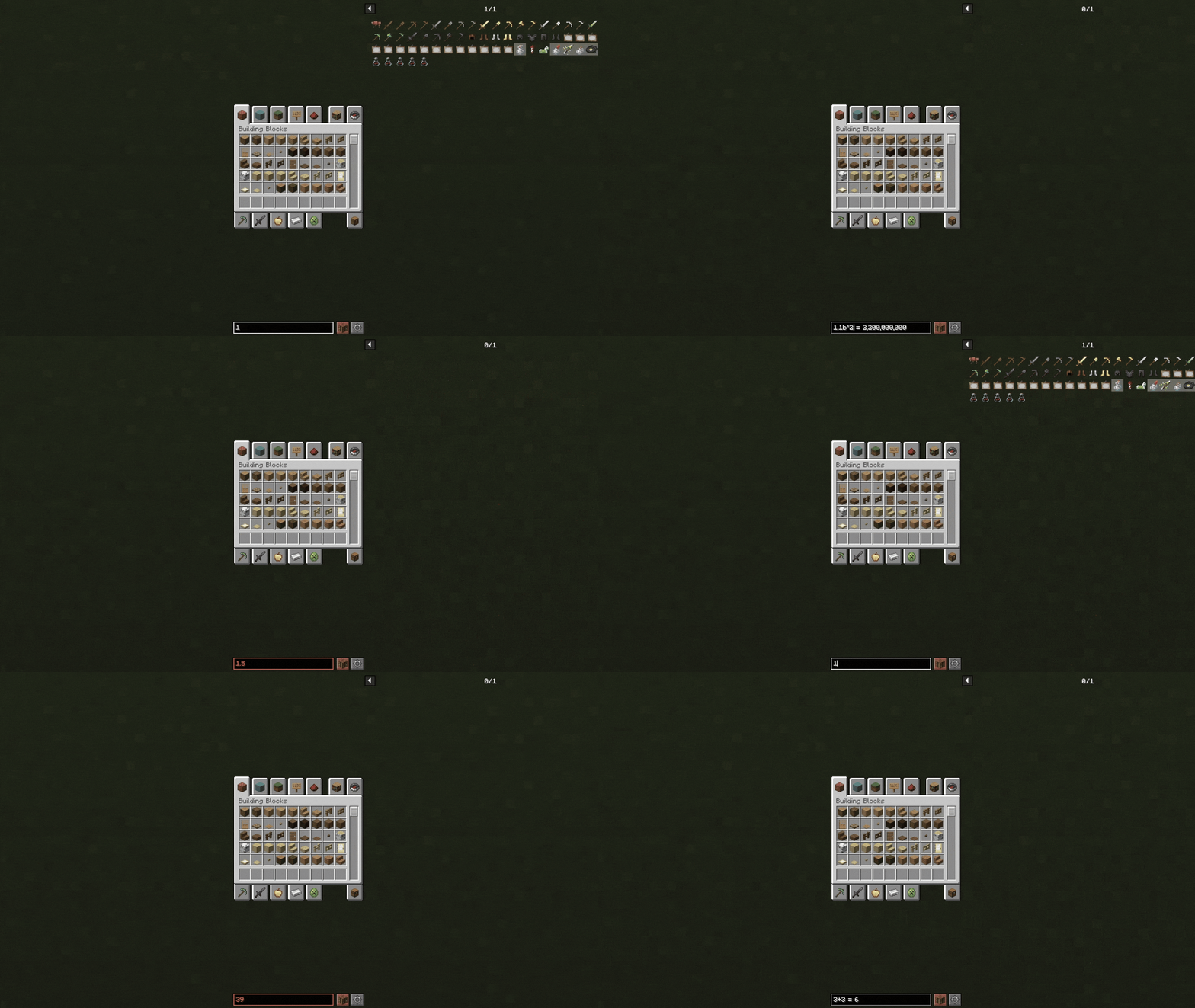 Calculator Showcase
 -
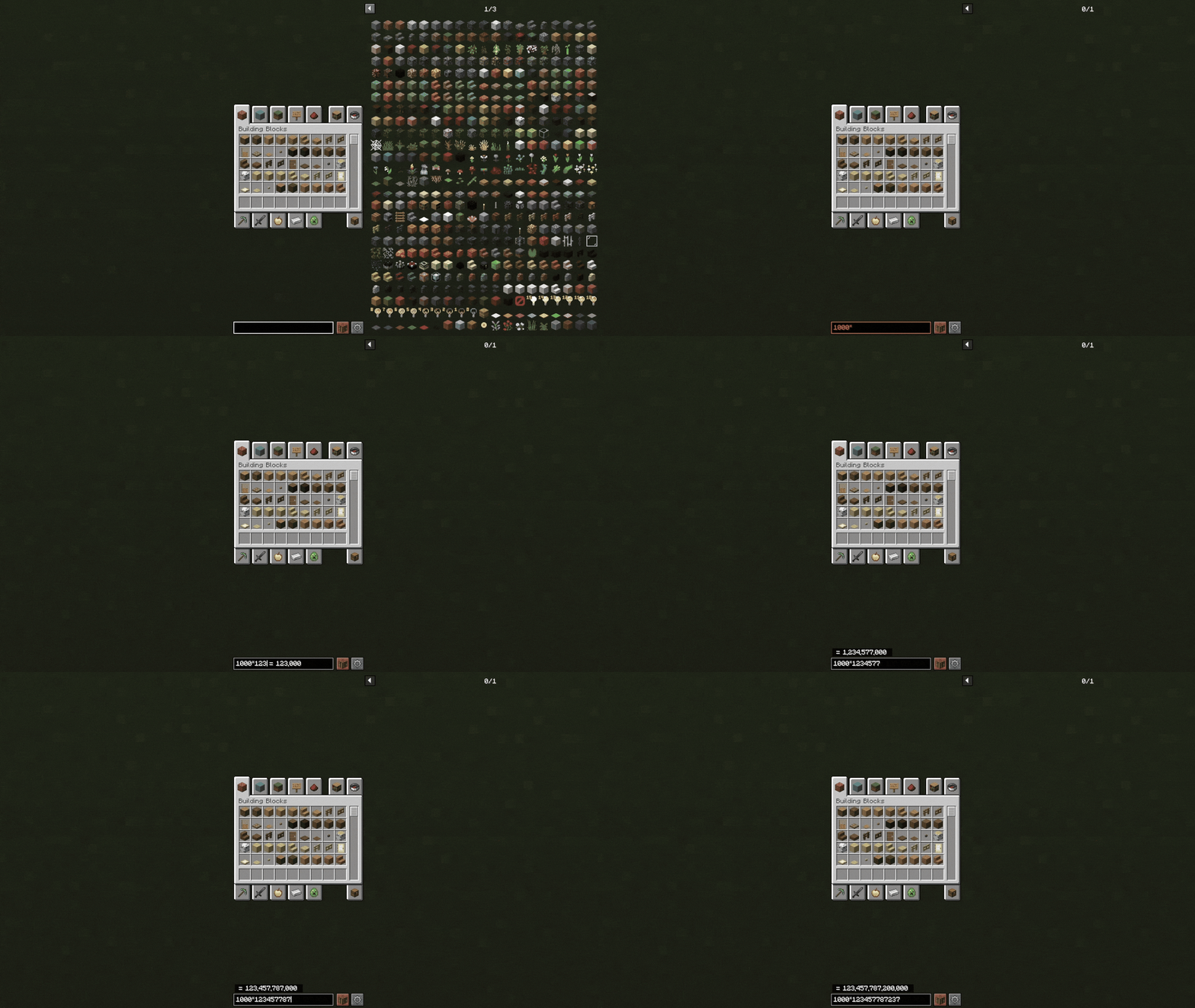 Overflow Answer Box Showcase When the equation result exceeds the search bar limit, the answer is shown in a separate box above for better visibility and clarity.
 -
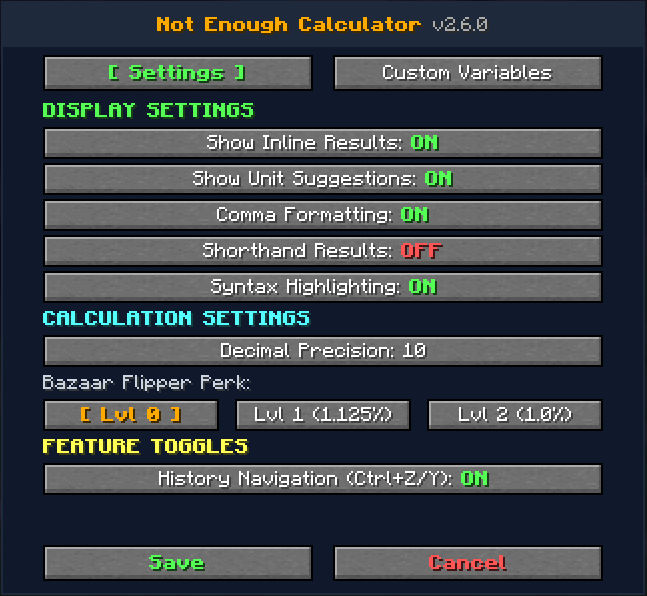 Reworked Settings GUI (/calcconfig) or via Mod Menu (v2.6.0+) Customize the calculator to fit your workflow. Configure inline search results, unit suggestions, comma formatting, decimal precision, shorthand outputs, SkyBlock Bazaar Flipper perk tax rates etc..!
 -
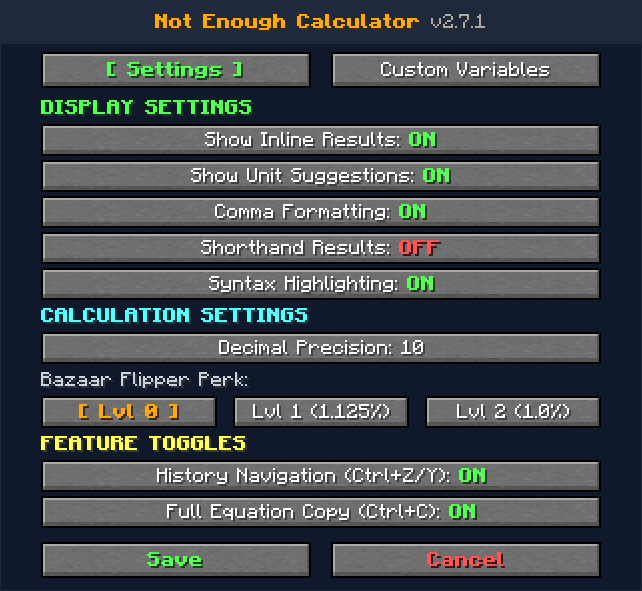 Settings GUI (/calcconfig) or via Mod Menu (v2.7.1+) Customize the calculator to fit your workflow. Configure inline search results, unit suggestions, comma formatting, decimal precision, shorthand outputs, SkyBlock Bazaar Flipper perk tax rates etc..!
-
 Calculator Showcase
 -
 Overflow Answer Box Showcase When the equation result exceeds the search bar limit, the answer is shown in a separate box above for better visibility and clarity.
 -
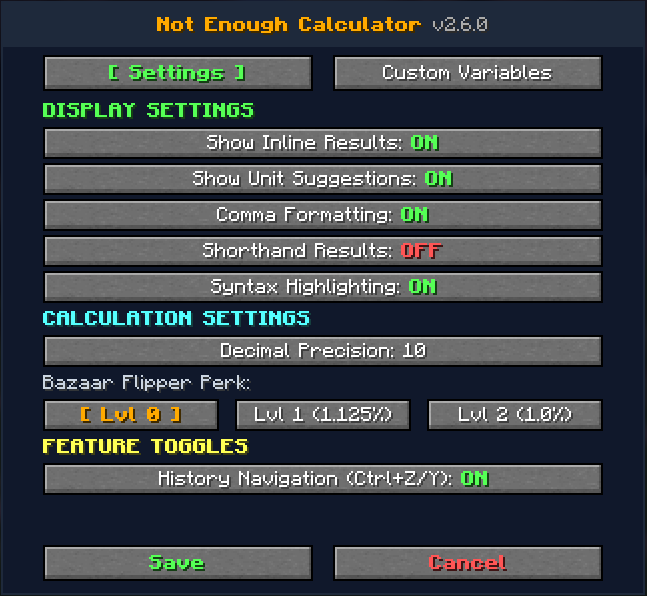 Reworked Settings GUI (/calcconfig) or via Mod Menu (v2.6.0+) Customize the calculator to fit your workflow. Configure inline search results, unit suggestions, comma formatting, decimal precision, shorthand outputs, SkyBlock Bazaar Flipper perk tax rates etc..!
 -
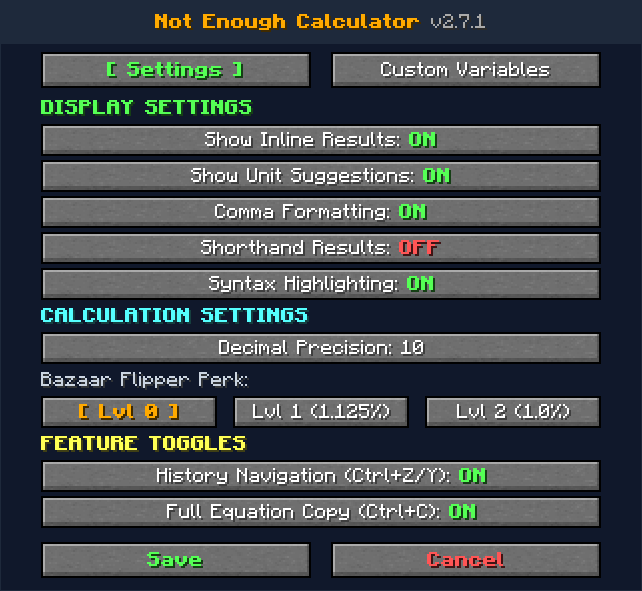 Settings GUI (/calcconfig) or via Mod Menu (v2.7.1+) Customize the calculator to fit your workflow. Configure inline search results, unit suggestions, comma formatting, decimal precision, shorthand outputs, SkyBlock Bazaar Flipper perk tax rates etc..!
Versions
Files
Relations
Project Relations
More like this
Similar Mods
Suggestions use data such as tags, dependencies, dependents, descriptions, titles, and more to rank how much they overlap with this mod.
On ModDex
Community snapshot
By the numbers
Statistics
Want to reach Minecraft players?
We're looking for a server hosting partner to feature here and other parts of the site. Interested? Send us a message!
Get in touchGet it on
Available Platforms
On ModDex
Community snapshot
By the numbers