Community listing page, reviews here may not be monitored by the author.
RPG Advanced Mod

No reviews yet
This is a mod intended to add a few RPG features inside Minecraft. #Modjam4 mod.

Community voices
Reviews
No reviews yet. Be the first to review this project!
Get it on
Available Platforms
About
Project Details
For authors
Embed Badge
If you're the author of this project, you can embed a live badge anywhere that supports HTML or Markdown. It updates automatically whenever ratings change.
Use HTML for any page that supports it, or Markdown for README files and Markdown-based descriptions.
Identifiers
Platform IDs
Resources
External Links
About
Description
RPGModAdv adds 3 types of items. Poles and wallsigns are used to create waypoints. Signs are then places on poles. When a sign is placed, you can choose a waypoint and the sign will automatically point toward the waypoint, showing the distance and the name of the waypoint (or a custom name is you wish so). Right clicking on a sign will display a "flypath" to the destination waypoint.
It also adds some breadcrumbs (glowcrumbs) that will drop on the ground automatically (when in the hotbar). Breadcrumbs are only visible by the player dropping them, decay in ~1h and are visible in low light level.
If a stack of breadcrumb is used on a sign, they will become linked. You can now walk to your destination following the path you want. Once you reach your destination, the path is set and right clicking on the sign will show the custom path instead of the "flypath". Custom path can be reinitialised by shift+right cliking the sign.
2 keybindings are included to clear the display of the path (Numpad 9) and hide/show the breadcrumbs (Numpad 8).
Screenshots
Gallery
-
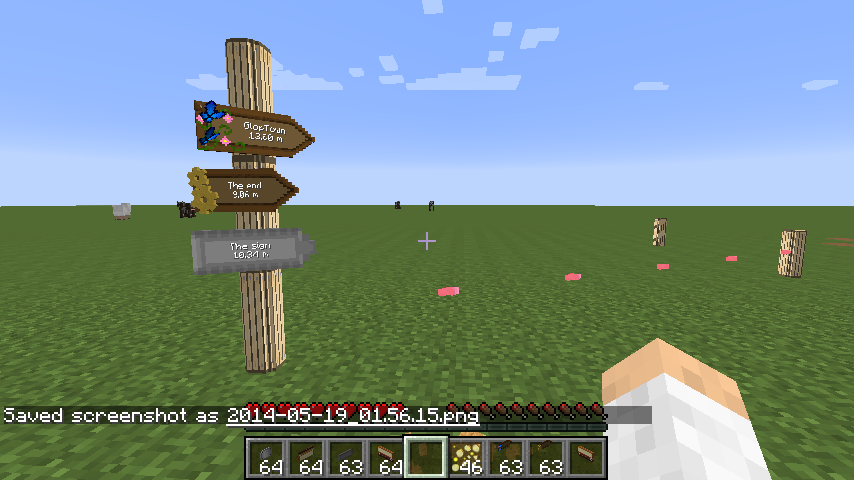 Short view
Versions
Files
Relations
Project Relations
More like this
Similar Mods
Suggestions use data such as tags, dependencies, dependents, descriptions, titles, and more to rank how much they overlap with this mod.
On ModDex
Community snapshot
By the numbers
Statistics
 (opens in a new tab)
Get it on
Available Platforms
On ModDex
Community snapshot
By the numbers
Statistics
Resources