Community listing page, reviews here may not be monitored by the author.
Simple Atlas


No reviews yet
A no-nonsense Vanilla+ Atlas for all your mapping needs! Heavily inspired by Map Atlases by Pepperoni-Jabroni

Community voices
Reviews
No reviews yet. Be the first to review this project!
Get it on
Available Platforms
Compatibility
Supported Environments
Must be installed on both the client and the server.
About
Project Details
For authors
Embed Badge
If you're the author of this project, you can embed a live badge anywhere that supports HTML or Markdown. It updates automatically whenever ratings change.
Use HTML for any page that supports it, or Markdown for README files and Markdown-based descriptions.
Identifiers
Platform IDs
About
Description
Simple Atlas
Carry your mapped world in one item.
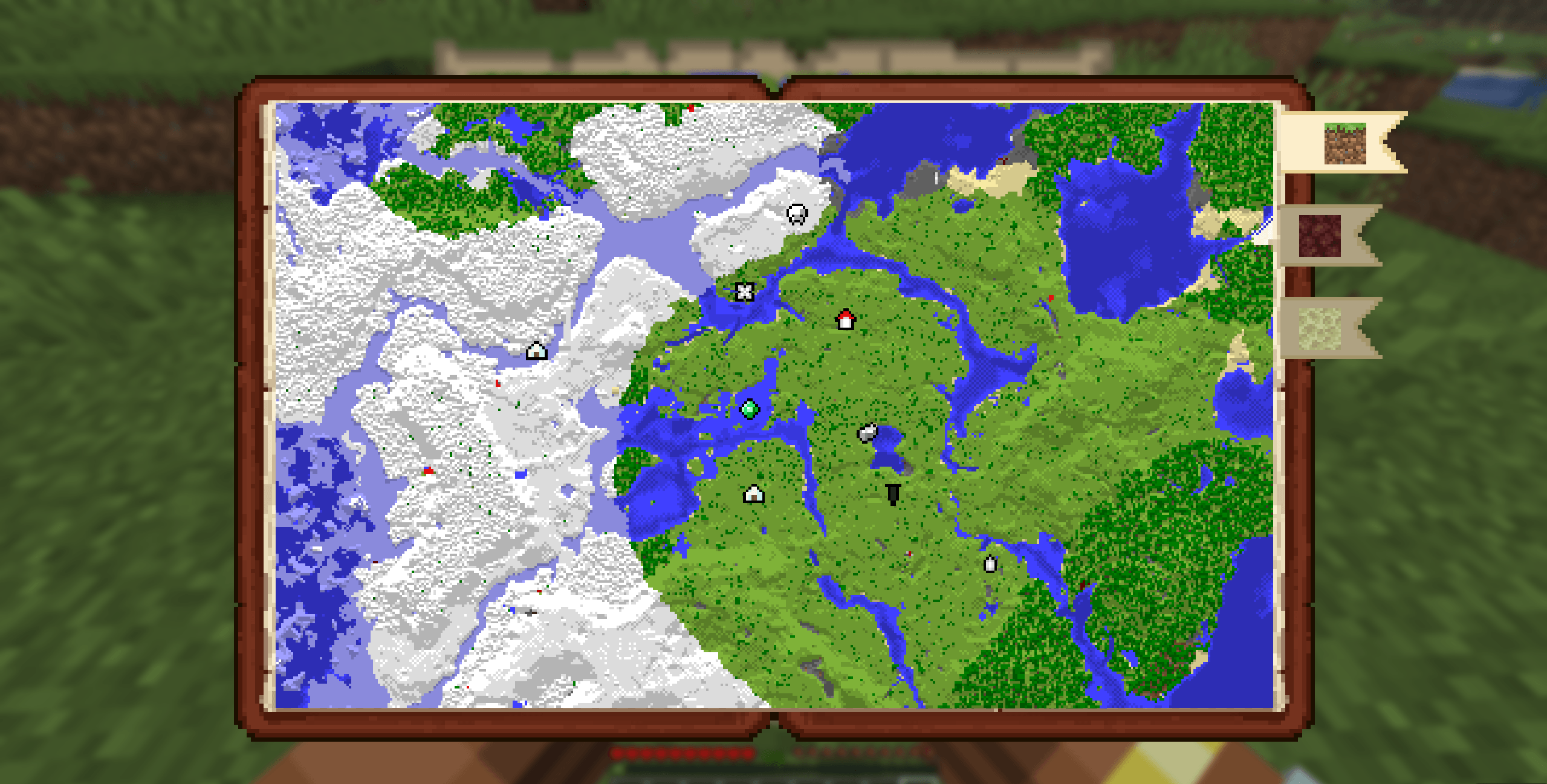
Simple Atlas adds an Atlas item that stores multiple filled maps and opens into a single interactive view, so you can pan around your explored area without juggling lots of maps.
Features
Atlas item
- Craft an Atlas and add filled maps through the cartography table
- Atlas only accepts maps with the same scale as the first map inserted
- Use a book at the cartography table to duplicate an atlas
- Use paper at the cartography table to scale every atlas map up by one level
- Merge two atlases of equal size at the cartography table to combine their maps and waypoints
- Lower-scale maps can be integrated into an existing atlas through the cartography table
Interactive world map
- Scroll to zoom
- Left-drag to pan
- Press
Rto reset zoom/pan to your current player position - Player marker is shown directly on the atlas
- Dimension bookmark tabs separate Overworld, Nether, End, and other-dimension atlas tiles
Waypoints
- Right-click on the atlas to create waypoints
- Use an atlas on a banner to add a waypoint from the banner's color and name
- Right-click existing waypoint markers for context actions
- User can edit or delete waypoints
- Waypoint and map-point context menus can copy coordinates
- Waypoint names are capped to keep labels readable
- Waypoints are saved in the atlas item itself
- Right-clicking a mapped tile can remove that map from the atlas and return the filled map item
Navigation compass
- Choose Locate on a waypoint to pin the waypoint to the locator bar
- Choose Stop Locating to remove pin
- Multiple waypoints can be pinned
Multiplayer-aware map syncing
- While a player is holding an atlas, map data is synced live from the server
- Atlas viewers are tracked server-side
How to use
- Craft an Atlas.
- Use the cartography table to add maps, duplicate atlases with books, scale atlases with paper, or merge equal-scale atlases.
- Hold the atlas in your main hand and use it to open the atlas screen.
- Scroll, drag, and switch dimension tabs to inspect your mapped area.
- Right-click map points or waypoints to manage waypoints, copy coordinates, remove maps, and optional navigation.
Recipe
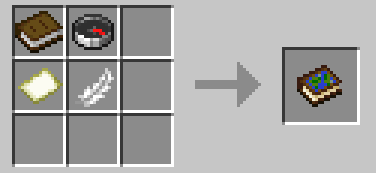
- shapeless
Compatibility
- Minecraft:
26.1.x - Loader: Fabric (
fabric-loader >= 0.18.6) - Java:
25+ - Fabric API: required
Notes
- The atlas layout expects maps of the same scale and will scale up smaller maps, but larger ones will be rejected
- Waypoint and navigation state is tied to each atlas item.
- Teleport actions in the atlas UI use player commands and may require permission depending on the server.
- Designed for both singleplayer and multiplayer survival workflows.
Issues/Feedback
- Report bugs or suggest improvements on the GitHub Issues page
Simple Atlas
Carry your mapped world in one item.
Simple Atlas adds an Atlas item that stores multiple filled maps and opens into a single interactive view, so you can pan around your explored area without juggling lots of maps.
Features
Atlas item
- Craft an Atlas and add filled maps through the cartography table
- Atlas only accepts maps with the same scale as the first map inserted
- Use a book at the cartography table to duplicate an atlas
- Use paper at the cartography table to scale every atlas map up by one level
- Merge two atlases of equal size at the cartography table to combine their maps and waypoints
- Lower-scale maps can be integrated into an existing atlas through the cartography table
Interactive world map
- Scroll to zoom
- Left-drag to pan
- Press
Rto reset zoom/pan to your current player position - Player marker is shown directly on the atlas
- Dimension bookmark tabs separate Overworld, Nether, End, and other-dimension atlas tiles
Waypoints
- Right-click on the atlas to create waypoints
- Use an atlas on a banner to add a waypoint from the banner's color and name
- Right-click existing waypoint markers for context actions
- User can edit or delete waypoints
- Waypoint and map-point context menus can copy coordinates
- Waypoint names are capped to keep labels readable
- Waypoints are saved in the atlas item itself
- Right-clicking a mapped tile can remove that map from the atlas and return the filled map item
Navigation compass
- Choose Locate on a waypoint to pin the waypoint to the locator bar
- Choose Stop Locating to remove pin
- Multiple waypoints can be pinned
Multiplayer-aware map syncing
- While a player is holding an atlas, map data is synced live from the server
- Atlas viewers are tracked server-side
How to use
- Craft an Atlas.
- Use the cartography table to add maps, duplicate atlases with books, scale atlases with paper, or merge equal-scale atlases.
- Hold the atlas in your main hand and use it to open the atlas screen.
- Scroll, drag, and switch dimension tabs to inspect your mapped area.
- Right-click map points or waypoints to manage waypoints, copy coordinates, remove maps, and optional navigation.
Recipe
- shapeless
Compatibility
- Minecraft:
26.1.x - Loader: Fabric (
fabric-loader >= 0.18.6) - Java:
25+ - Fabric API: required
Notes
- The atlas layout expects maps of the same scale and will scale up smaller maps, but larger ones will be rejected
- Waypoint and navigation state is tied to each atlas item.
- Teleport actions in the atlas UI use player commands and may require permission depending on the server.
- Designed for both singleplayer and multiplayer survival workflows.
Issues/Feedback
- Report bugs or suggest improvements on the GitHub Issues page
Screenshots
Gallery
-
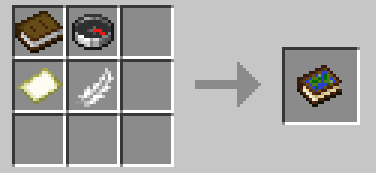 Atlas crafting recipe atlas_recipe.png
 -
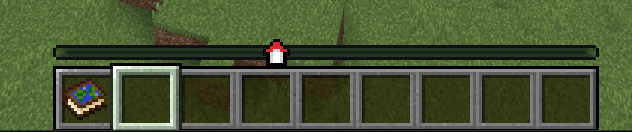 Waypoint on Locator Bar locator_bar.png
 -
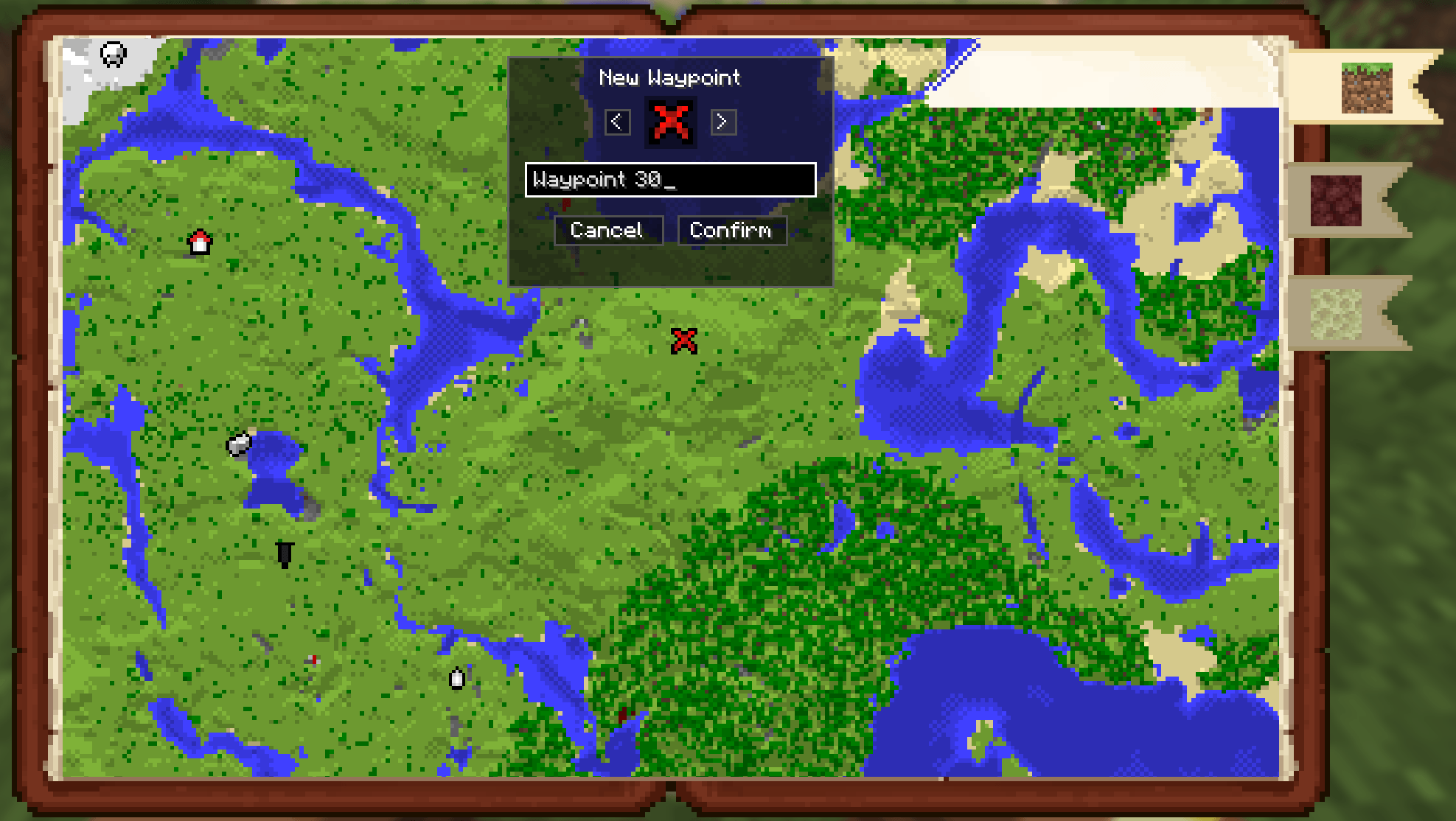 Waypoint creation menu waypoint_creation.png
 -
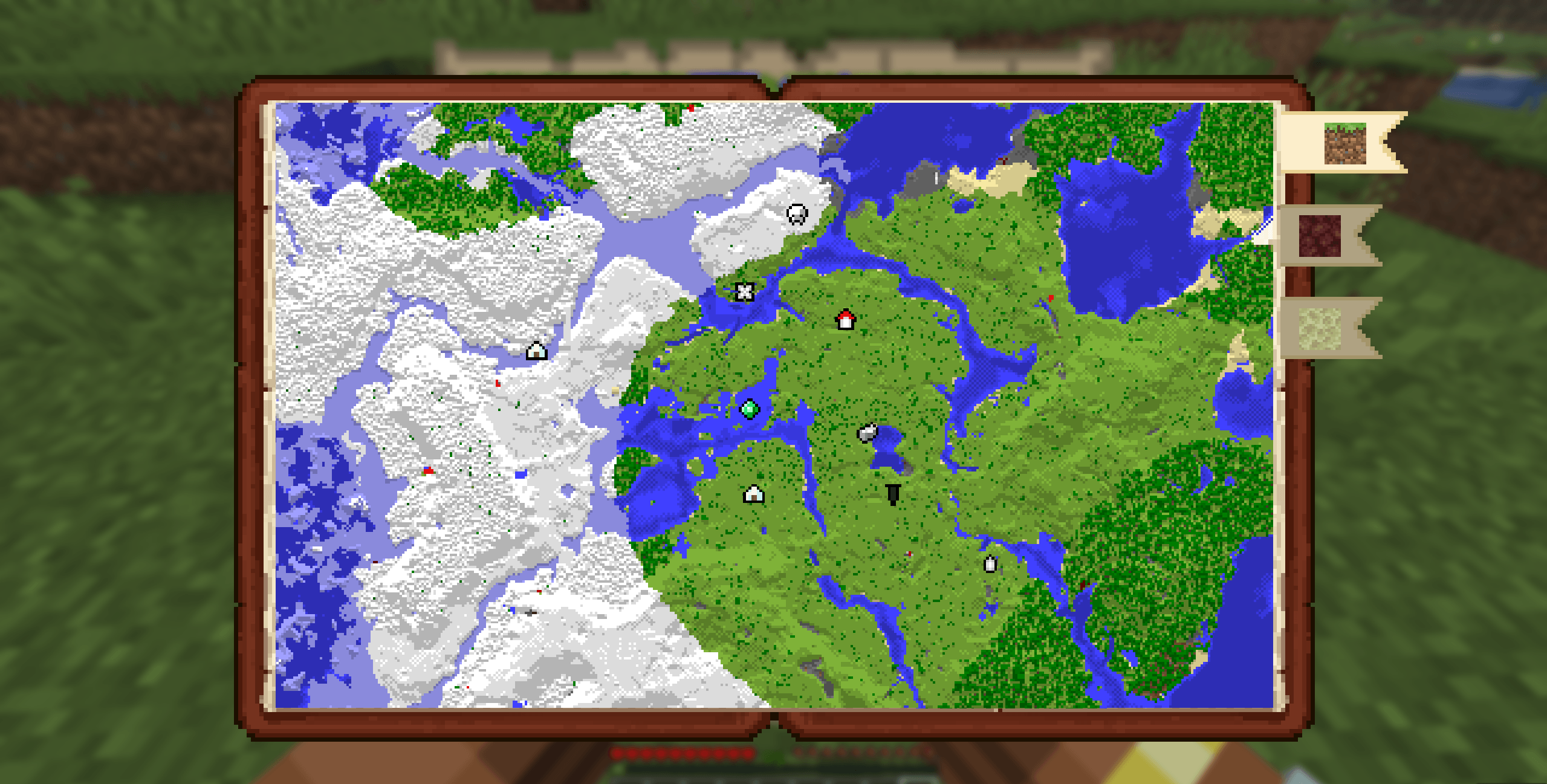 Atlas menu
-
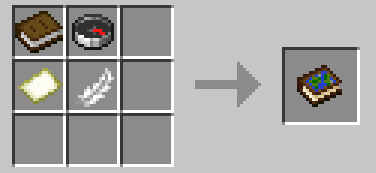 Atlas crafting recipe The recipe calls for a book, compass, map, and feather in any order
 -
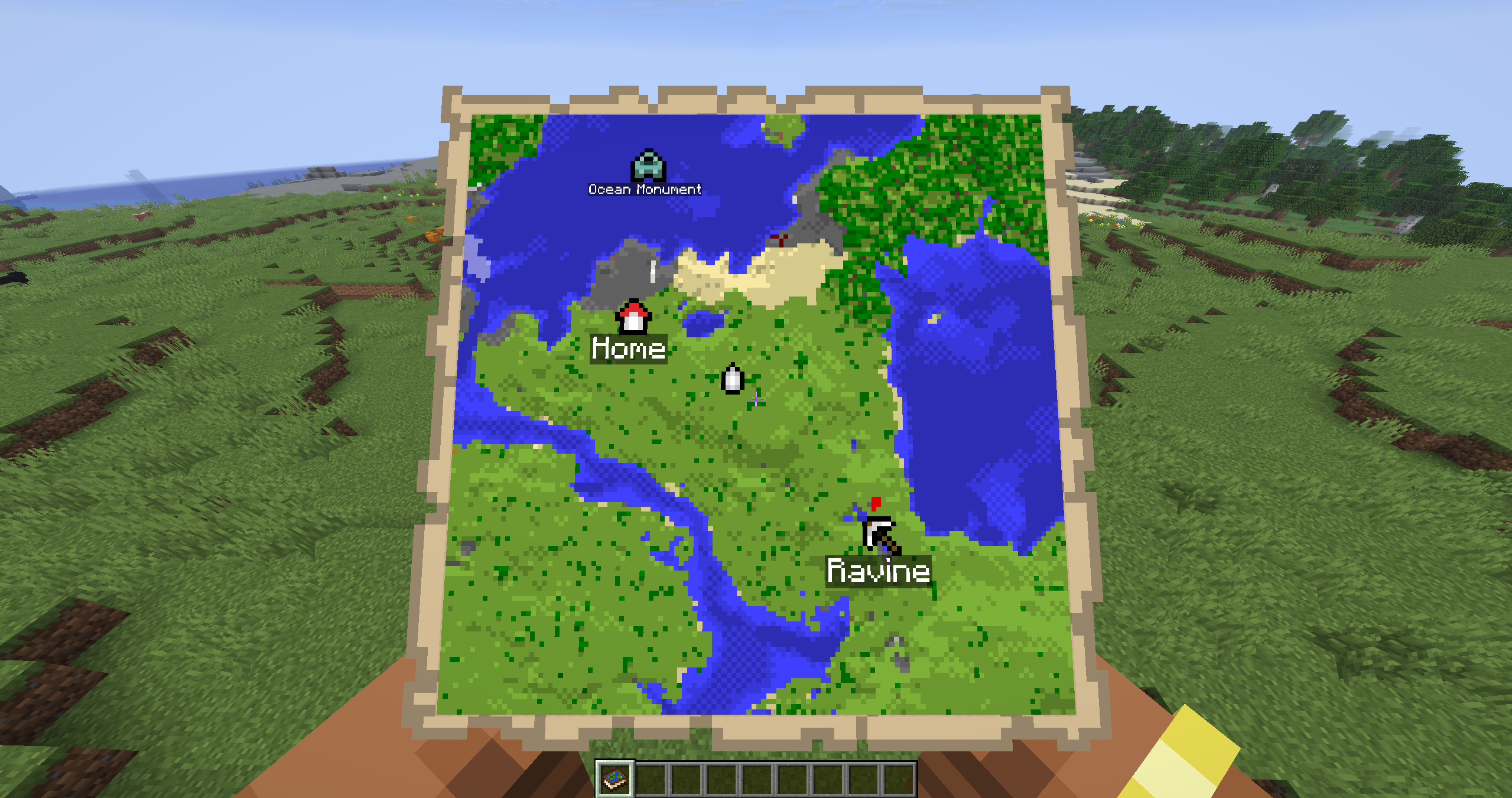 Atlas in hand See your current position by holding the atlas in your hand. Waypoints will also show on the map
 -
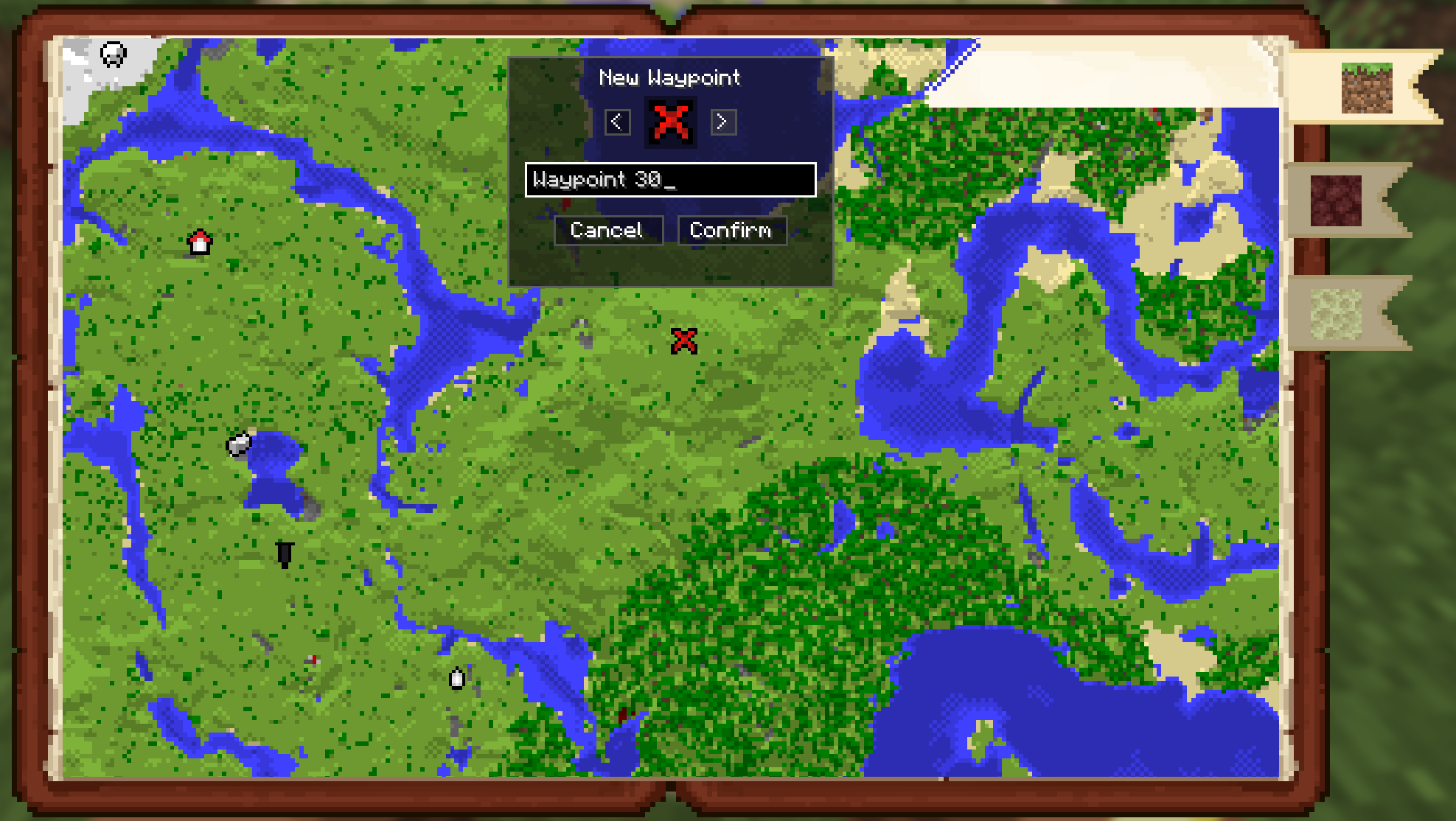 Waypoint Menu right click anywhere to add a waypoint
 -
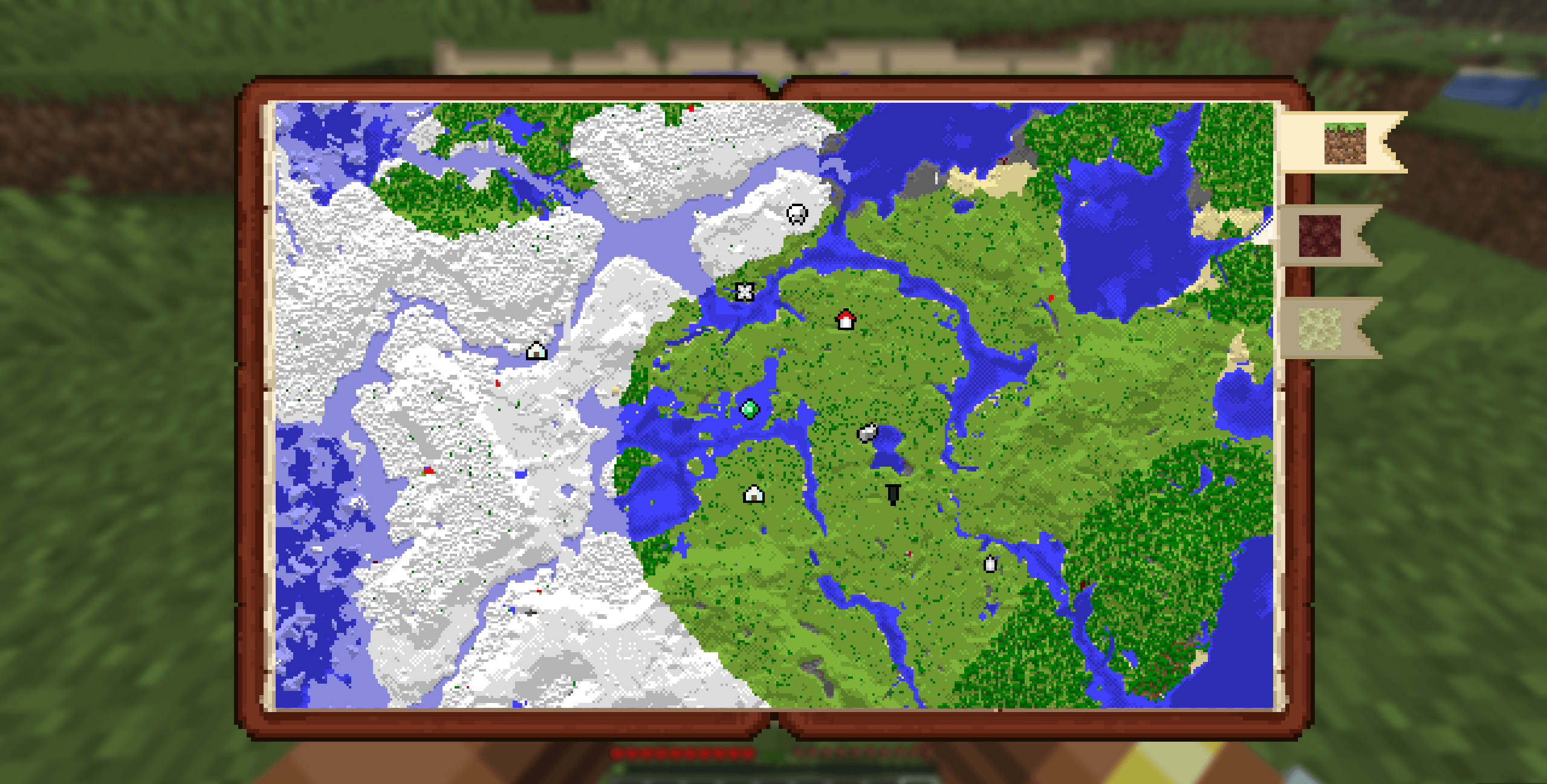 Atlas Menu
 -
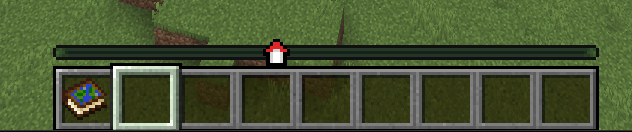 Waypoint on Locator Bar right click on a waypoint to pin it to the Locator Bar
Versions
Files
Relations
Project Relations
More like this
Similar Mods
Suggestions use data such as tags, dependencies, dependents, descriptions, titles, and more to rank how much they overlap with this mod.
On ModDex
Community snapshot
By the numbers
Statistics
 (opens in a new tab)
Get it on
Available Platforms
On ModDex
Community snapshot
By the numbers